
How do I extend an AUX cable without losing a channel?
A desk speaker with a fixed lead needs a different extension from a car stereo with an empty AUX input. Check which end is already attached and whether your device has a recessed socket or a thick protective case.
Count the bands on the plug
An ordinary stereo plug has two insulating bands. A headset that also carries a microphone may have three. If a call works through the headset alone and loses your voice through an extension, compare the number of contacts on both pieces. Use a slim housing where a phone case leaves little room around the jack.
Extend or split the listening position
A male-to-female cable extends the lead you have. A stereo Y cable with two female sockets lets two listeners share one output. For a car radio and a phone that both have AUX sockets, pick male ends on both sides. Test left and right separately before hiding the cable under the dash.
Why does sound change when I press on the plug?
Before replacing a speaker or ordering a longer cable, remove a thick case and reseat the plug. Try the same source with another known pair of headphones. A socket that works only with sideways pressure deserves inspection. A longer lead will add reach without fixing that intermittent contact.
Give two listeners a preview from one headphone jack
An editor and a client sharing a laptop may both want to hear a cut before it goes online. The six-inch 30S1-35360 splits a compatible stereo headphone output into two stereo sockets. Its short body fits on a desk, but plugging two headset microphones into it will not create separate recording inputs. Check whether either listener needs independent volume control and whether the laptop can provide a comfortable level to both headphones. Start at a low listening level and try speech as well as music. For a recording session, write down how many playback outputs and microphone inputs you want before choosing the adapter. For repeat sessions, keep the laptop output setting with the splitter.
How do I record a phone’s stereo output into an audio interface?
A phone feeding a pair of powered speakers can use one stereo AUX lead. An interface with separate mono line inputs handles those same left and right channels differently. Look for a breakout that sends the phone’s left channel to one input and its right channel to the other. A headphone-sharing Y adapter duplicates the stereo signal at each branch, so it serves another purpose. In the recording software, assign both inputs to a stereo track and test with an audio file that identifies left and right aloud. If your phone lacks a headphone jack, confirm that the phone adapter supports analog audio output first. Buying a longer 3.5 mm cord only changes how far that output can reach.
Compare parts for your setup
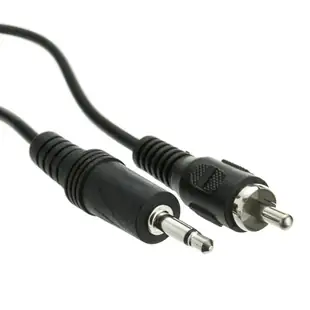
3.5mm Mono Male to RCA Male Cable, Black, 6 foot
10A1-07106
- Connector references
- RCA Male
- Dimensions in listing
- 3.5mm
- Length
- 6 ft
Compare the plug contacts and the other end against the device manual, particularly for headset and video jacks. Measure the installed route against this 6 ft length.
3.5mm Stereo to Dual RCA Audio Adapter Cable, 3.5mm Female to Dual RCA Male (Red/White), 6 inch
30S1-01261
- Connector references
- RCA · RCA Male
- Dimensions in listing
- 3.5mm
- Length
- 6 in
Compare the plug contacts and the other end against the device manual, particularly for headset and video jacks. Measure the installed route against this 6 in length.
3.5mm Stereo Male / 3.5mm Stereo Male, TRRS Mic Cable, 3 ft
10A1-40103
- Dimensions in listing
- 3.5mm
- Length
- 3 ft
Compare the plug contacts and the other end against the device manual, particularly for headset and video jacks. Measure the installed route against this 3 ft length.


