
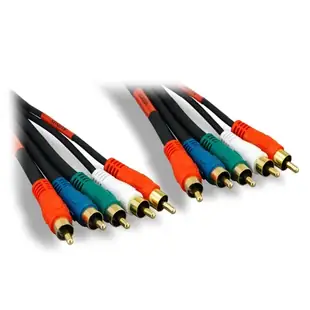
Connect a component-video DVD player to a TV
The green, blue and red RCA sockets on an older DVD player often carry one picture across three wires. The separate red and white sockets carry sound. Two red plugs in one bundle are a surprisingly common cause of a picture with odd colors or a silent movie.
Follow Y, Pb and Pr at both ends
Read the lettering on both devices. Some TVs share the green component input with a yellow composite video input and require selecting the right mode. If your TV provides a small breakout jack, check the TV model’s required breakout before buying a three-plug cable.
When is a five-plug cable useful?
Choose the three-lead version when audio already travels to a receiver by another route. Choose the bundle with two audio plugs to send stereo sound alongside the picture. Label the audio red plug while both ends are visible. Try playback before pushing the player back against the cabinet.
Does a black-and-white picture mean the cable is broken?
Seeing an image at all tells you one part of the path is alive. Check the selected component or composite input mode, then compare the three picture connectors against the printed letters. Inspect any red plug borrowed by the audio pair before deciding a conductor has failed.
Reconnect a DVD player without mixing up the two red plugs
A five-plug component-and-audio harness can leave you holding two red RCA plugs at the same end. On 10V2-03206, three plugs serve the component picture and a separate pair serves right and left audio. Keep the video group together and follow the Y, Pb and Pr markings on both machines. Match the audio pair to the inputs assigned to that component source on the receiver. If you get a picture with strange colors or silence, identify which red lead belongs to which branch before shopping for another cable. Photograph the finished rear panel with the source name visible for the next person. Test dialogue with a familiar scene so a channel swap is easier to hear.
Will an older television accept the player’s progressive-scan setting?
Look up the supported component input formats for the exact television. A DVD player may offer both interlaced and progressive output, while the display accepts only selected timings on those three sockets. If the opening menu was visible and the picture vanished immediately after changing the player’s scan setting, that sequence is a useful clue. Consult the player manual for restoring a supported output mode. Test that mode before changing the three cables or buying a converter. If you are selecting a player for a display in a museum exhibit, record the working setting and what happens after a power cycle. A player that restores an unsupported output on startup can create a recurring blank screen even with a sound cable.
Compare parts for your setup
High Quality Component Video and Audio RCA Cable, 3 RCA (RGB) and 2 RCA (Right and Left) Male, Gold-plated Connectors, 6 foot
10V2-03206
- Connector references
- RCA
- Length
- 6 ft
Read the port labels on both devices and check whether the item also includes left and right audio leads. Measure the installed route against this 6 ft length.
High Quality Component Video Cable, 3 RCA Male (RGB), Gold-plated Connectors, 6 foot
10V2-03506
- Connector references
- RCA Male
- Length
- 6 ft

