
Identify an S-Video output on a camcorder or VCR
A round socket on a capture device can look like the mouse or keyboard socket on an older computer. Read S-VIDEO beside the port and compare the four-pin Mini-DIN pattern. Forcing a plug into the wrong keyed socket can bend its small pins.
Plan the audio connection too
S-Video carries the picture. To capture a home movie with sound, follow the playback device’s audio outputs to the audio inputs actually used by your capture software. Make a short test recording and play it back with headphones before transferring an entire tape.
What if the display has only yellow RCA?
Read the adapter’s description and the supported signal on each device. A simple Mini-DIN-to-RCA adapter has no HDMI output or scaling function. For a straight S-Video run, choose male plugs for two female sockets and measure the route to avoid pulling on a vintage port.
Which cable belongs in a digitizing kit?
Keep the picture lead, audio leads and any camera-specific breakout together, especially when the playback unit travels. Photograph the original connections and keep a brief sound-and-picture test file labeled with the model. It gives you a useful comparison when another tape appears to have a fault.
Keep the original camcorder lead separate from the audio pair
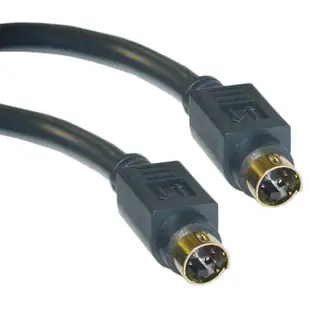
A family tape can play on the camera's own screen even though a capture box shows a black window. Locate the camera's video output, select its playback mode, then identify the capture input chosen in the software. If both endpoints use a four-pin S-Video connection, a male-ended lead such as 10S2-01106G handles the picture. Sound must be taken from the camera's appropriate audio output. If the capture box offers only composite video, check what conversion the two devices support. Save a short clip with an unmistakable movement and voice before committing an hour to a silent or blank transfer. Listen to the saved file on the computer after the capture finishes.
Does recording through S-Video make an ordinary tape high definition?
S-Video separates brightness and color information on compatible analog equipment. It can be worth comparing with composite if the playback unit and capture device genuinely support both. It cannot add detail that the original recording never contained. For a fair decision, capture the same short passage through each input using the same device, settings and playback deck. Pick a passage with fine lettering and strong color edges; examine it at the same viewing size and check motion as well as still frames. If one recording is softer, first confirm the capture software selected the intended physical input. For an archive project, keep a note of the deck model, connection and capture settings. That information makes a later recapture much easier to compare.
Compare parts for your setup
S-Video Cable, MiniDin4 Male, Gold-plated connector, 6 foot
10S2-01106G
- Connector references
- S-Video
- Length
- 6 ft
Compare the pin pattern and input label, especially when one end uses an RCA adapter. Measure the installed route against this 6 ft length.
S Video to RCA Adapter, S-Video (MiniDin4) Female to RCA Female
30S2-05400
- Connector references
- S Video · RCA · S-Video · RCA Female
S Video to RCA Adapter, S-Video (MiniDin4) Female to RCA Male, Gold Connectors
30S2-05500
- Connector references
- S Video · RCA · S-Video · RCA Male


