
Choosing a J-hook and its mounting accessory
A box of cable supports does little good if the mounting hardware fits a different beam. Separate two questions on the order: how large the cable bundle is and where the support will attach.
How much room should the hook provide?
Ask the cable designer to specify supported bundle size, permitted load and support spacing for the actual pathway. Compare the hook’s usable opening and shape to the bundle. Plan separately for places where several branches come together and for future drops called out on the drawing.
What does the mounting description mean?
Standard-mount hooks, hooks with clips, and beam-clamp accessories appear together here. Verify the structure and attachment range before counting packs. A bag of mounting clips may supply a different quantity from a bag of hooks, and some assemblies include both pieces.
What happens where runs split above several rooms?
Label each branch on the pathway drawing and total only the cables that actually follow that section. A large common trunk may need a different support model from a short branch. Ask the installer to mark those transitions before turning quantities into bags of identical hooks and clips.
Plan supports by route and mounting surface
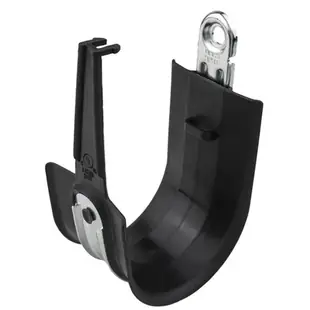
A drawing showing fifteen cables says little about how many supports a route needs. Identify each turn, branch and mounting surface and have the installer specify spacing and load. Compare the proposed bundle to the hook opening and the support’s published limits. Part 92J1-12202 is a two-inch standard-mount J-hook in a 25-pack. Check that the listed mounting method suits each location and that the order includes any separately required hardware. During a walk-through, note where a future branch will leave the route. Keeping that position identifiable can save time when the next set of rooms is fitted out.
Comparing hardware for a retrofit and a new ceiling pathway
An existing pathway may already have approved attachment points, but available space in its hooks can change from one section to the next. Ask the installer to survey the tightest section and locate any branches before deciding whether to use spare capacity or add a separate supported route. On a new project, the designer can specify both the support and the attachment at each type of structure. Avoid translating a drawing that shows a hook symbol into a single generic item for the whole building. Match the attachment method to the actual locations. When supplies arrive, sort standard-mount hooks, clips and mounting accessories by area so crews receive the combination approved for that part of the project, not simply a box containing the nearest hook size.
Compare parts for your setup
2 inch High Performance J-Hooks, Standard Mount, Black, 25-Pack
92J1-12202
- Dimensions in listing
- 2 inch
- Package quantity
- 25-Pack
Support several data cables above a communications room using the mounting style specified for the structure. The pack contains 25 pieces; count the parts required per installation.
J-Hook Mounting Accessory. 1/8in - 1/4in. Hammer-on Beam Clamp, 100pcs
JH910-100
- Dimensions in listing
- 1/8in · 1/4in
- Package quantity
- 100pcs
Support several data cables above a communications room using the mounting style specified for the structure. The pack contains 100 pieces; count the parts required per installation.
2 Inch J-Hook Multi-Function Batwing with Retainer Clips, 25 pack
92J1-50003
- Dimensions in listing
- 2 Inch
- Package quantity
- 25 pack


