
Organizing patch leads in the space a rack actually has
When a rack door closes on Ethernet plugs, simply shortening the cables may leave the same problem. Measure the clearance between patch ports and the door, the free rack units and the path to the side of the cabinet.
Would a finger duct help here?
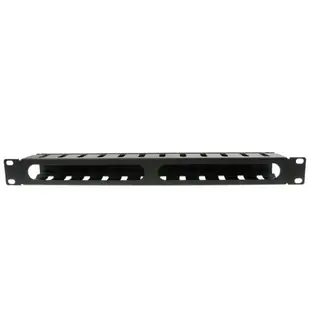
A one-unit finger duct provides openings for branches to individual ports. Estimate the number and thickness of leads that enter from each side. Leave enough space for a technician to move one lead and close the cover without bending a connector sharply.
What else appears in this category?
This selection also includes ties and cable organizing tools. A cable comb helps arrange a bundle during preparation, while the rack-mounted manager stays in the cabinet. Identify which job is unfinished before adding both to a cart.
Where should I put the removable bundle?
A mobile training rack may carry permanent internal leads alongside cords that get unplugged after every class. Give them distinct exits and record the removable group on its port map. This lets staff unpack the rack or move it without disturbing the internal patching and neatly routed fixed cords.
Leave room to read the port labels
Draw the front of the rack with the patch panel and switch in their real positions. Try routing the busiest group of cords through the proposed manager. A horizontal manager like 61B3-10024 occupies one rack unit, so reserve that space when counting available positions. Verify the rack width, door depth and whether hands can still reach the connector tabs. A manager that looks tidy with three sample cords may hide the labels once all twenty-four routes are populated. Check the final sketch with whoever changes patches at the site, and record the rack unit number on the diagram.
Mapping short patch cords before adding more organizers
Photograph the present rack and trace one representative lead from its switch port through the manager to the patch panel. Note which parts of the manager are congested and which remain empty. Sometimes several leads share one exit because they were added over time, even though another route through the same manager is available. Discuss any repatching with the network owner and work from the documented port map. If additional hardware is needed, decide whether the added guides should support horizontal movement between nearby ports or direct bundles toward a vertical route. Measure the occupied rack units again with the proposed manager in place. A neat front view is only useful if staff can still see equipment labels, replace a patch lead and close the cabinet without pressing on the cords.
Compare parts for your setup
19 Inch Rackmount Cable Management, 12 Slot, 1U, Metal, Black
61B3-10012
- Mounting
- 1U
- Dimensions in listing
- 19 Inch
Heat-shrink Tubing, Asst Colors, Precut, 160 pieces, 4 inches long
9005-10300
- Dimensions in listing
- 4 inches
- Package quantity
- 160 pieces
Use the item’s stated purpose to choose a cable guide, mounting screw or power-distribution unit for a cabinet. The pack contains 160 pieces; count the parts required per installation.
10-32 Rack Screws with Washers, 100 Pieces
30D1-042HD
- Package quantity
- 100 Pieces
Use the item’s stated purpose to choose a cable guide, mounting screw or power-distribution unit for a cabinet. The pack contains 100 pieces; count the parts required per installation.


