
Which Comzon accessory solves the missing connection?
The Comzon name appears on several kinds of accessories in this assortment, including HDMI cables, USB-C cables and surge protectors. Start with the job you need to finish. Connecting a console to a high-refresh TV raises different questions from charging a laptop at a crowded desk.
What should I compare on a cable listing?
For an HDMI purchase, identify the resolution and refresh rate supported by both devices and check the cable’s certification at the length you need. For a USB-C purchase, record charging wattage and data rate as separate requirements. A laptop charger, cable and laptop must all support the power level you expect.
Will it physically fit the desk?
Behind a monitor, compare the connector housing with the space left by the stand. For a power strip, sketch the orientation of bulky chargers and the wall outlet. A rotating plug or a differently oriented outlet can free space that the advertised number of sockets alone does not reveal.
How can I replace the same accessory later?
Save the part number and the exact length along with the device combination you tested. An entry marked USB-C may describe a charge lead, a display-capable cable or a higher-rate data cable. For a shared desk, a small tag on the working cable helps people return it to the right setup.
Pack a tabletop product photography kit
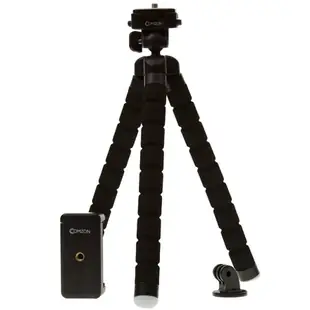
For quick product photos at a craft fair, the useful question is whether the phone will stay put while you change the merchandise. The C2004 is a flexible mini tripod described for phones and cameras. Check the supplied holder, mounting thread where relevant, phone dimensions with the case on and the weight it can safely support. A tabletop sample shot will tell you whether the intended framing works in the available space. Add a charging cable only after checking the power bank and phone ports. Record the tripod and cable as separate kit items so you can replace the missing piece without repurchasing the whole setup. Mark the preferred position on the table with removable tape before packing up.
How do I choose a charger for two people sharing a car?
A USB-C socket and a USB-A socket make it physically possible to plug in two leads, but the power available with both occupied depends on the charger’s stated output combinations. Write down what the driver and passenger actually need. Keeping a phone charged while running navigation is a different task from charging a laptop at its normal rate. The catalog distinguishes the car charger that goes in a vehicle accessory outlet from the wall charger that plugs into household power. Check each phone’s supported charging method, the cable already in the glove box and the charger’s rating with both ports in use. Where the listing only gives the highest output of each port, ask for the simultaneous-output specification before promising both passengers fast charging.
Compare parts for your setup
Comzon 40Gbps 100 watt USB4 Cable, 8K/4K 1080p, ThunderBolt 3 & 4 Compatible, Fast Charging, USB Type C Male, Braided Jacket, 3 foot
C2034
- Connector references
- USB Type C Male
- Data rate
- 40Gbps
- Video format
- 8K · 4K · 1080p
- Power rating
- 100 watt
Consult both the host and accessory specifications for video output, charging direction and data rate. Measure the installed route against this 3 ft length.


