
Selecting the optical side of an Ethernet media converter
Two buildings already have fiber between them, but the equipment has copper Ethernet ports. At the fiber handoff, identify the fiber type, available strands and panel connectors before comparing converters. Record the required Ethernet rate as well.
Does a fixed SC converter match the far end?
Read the optical wavelength, signaling rate, connector and fiber mode on both devices. The catalog includes fixed Fast Ethernet models and units using removable SFPs. A device described as unloaded needs a suitable optic. A long advertised reach alone cannot establish compatibility with the other endpoint.
Can I use only one strand?
Look at matched bidirectional units when the design provides one strand. The transmit wavelength at one end must match the receive wavelength at the other. Confirm whether the listing supplies a complete complementary pair or one side before ordering.
What should I put in a remote-site spare kit?
List the converter, approved power supply, installed optic and local patch lead separately. For a bidirectional pair, label the spare with its transmit and receive wavelengths and the end of the route it can replace. A spare that looks identical may be the complementary half required at the other site.
Does the far end already contain the optical interface?
A common quote requests two converters when one end is a switch with a suitable optical module. Sketch the actual interfaces on both devices, then identify what needs conversion. Compare data rate, wavelength, fiber mode, connector, duplex or simplex operation, and the documented reach for that combination. The 71F1-103SC has an SC multimode optical interface and a copper Fast Ethernet side. Check each side against the proposed endpoints. If power is scarce at a remote cabinet, include the converter’s local power arrangement in the purchasing decision rather than discovering it after the fiber is ready.
A pair of converters versus one converter and an optical switch
Draw the end devices before ordering a pair by default. If a router closet already has an appropriate optical switch port, the remote room might require just one converter and a matching switch optic. If both sites offer copper Ethernet only, two compatible optical endpoints and suitable power sources will be needed. Mark copper and optical segments separately, including panel jumpers. A box with an LC or SC socket answers the physical connector question but leaves speed and optical application to confirm. Ask operations who will monitor each endpoint and where replacement supplies are kept. That practical question can influence whether a loaded converter or a modular converter with a separately stocked optic is easier to maintain. Record the approved pair of endpoints even when they are different kinds of devices.
Compare parts for your setup
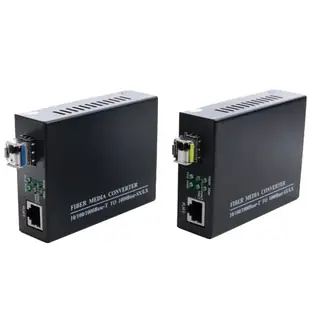
BIDI Fiber Media Converter, 1Gig, Singlemode, Simplex SFP Slot, TX1310nm/RX/1550nm, TX1550nm/RX1310nm, 20km, LC Simplex, 1 Pair
71F1-51SFP
- Connector references
- LC
- Configuration
- Simplex
- Fiber specification
- Singlemode
SFP 100MB Fast Ethernet 1310nm Multimode, 2 km range, MSA Standard Compatible
71F1-41001
- Fiber specification
- Multimode
RJ45 to SC Fast Ethernet Media Converter, Multi-Mode Fiber, 850nm, 550m
71F1-103SC
- Connector references
- RJ45 · SC
- Fiber specification
- Multi-Mode


