
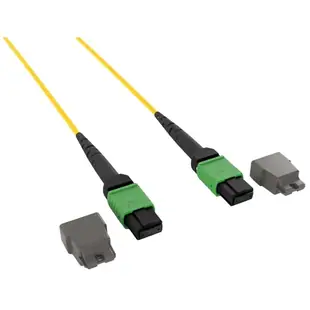
Specifying an MPO trunk or breakout for the actual ports
A dozen fibers can end in one compact housing, but that housing says little about their order at the other end. For an MPO or MTP purchase, obtain the port diagram and the polarity plan from the network designer.
What goes on the order besides fiber count?
Record the number of positions, keyed orientation, pinned or unpinned interface, polish, fiber type and polarity method. A trunk running between cassettes serves a different configuration from a breakout ending in several duplex LC pairs. Compare diagrams for both assemblies before choosing.
Will a matching aggregate speed make it work?
Check the exact transceiver specification for parallel or duplex fiber and supported media. If a seller’s title combines conflicting mode and optic details, request a manufacturer drawing for that part number before purchase. Label breakout legs by destination so later moves preserve the lane map.
How should I plan a future migration?
Keep the cable wiring map and cassette model with the installation records. When equipment changes from a trunk-and-cassette arrangement to direct parallel optics, ask the designer to trace the fibers through the existing hardware. Document which parts of the current route can be retained and which interfaces must change.
Verify the map from a trunk to individual ports
For a breakout project, draw the parallel port on the switch, the trunk or cassette, and the individual destination ports. A product with an MPO or MTP end may have a different fiber count, pin arrangement or polarity from the existing plant. The MPMP-31010 lists a twelve-strand OM3 Type B assembly with female ends. Use those values only for that exact part and compare them with the vendor’s optical and polarity plan. Before ordering repeated assemblies, verify which numbered branch maps to each equipment port and how the labels will remain readable in the cabinet.
One trunk with cassettes or several breakout leads?
Consider a switch that presents multiple optical lanes at one port and a patch panel that presents individual duplex LC pairs. A breakout assembly can make the lane mapping visible at the individual legs. A separate trunk and cassette can move the breakout function into a panel that other staff access routinely. Before comparing costs, ask the designer for the supported transceiver breakout configuration and identify which component handles each polarity transition. A mechanical match between an MPO cable and a cassette does not document where the transmit and receive lanes arrive. Request labeled diagrams for the complete proposed combination. Put switch port, lane number and destination on the handover sheet so a technician can move one endpoint later without interrupting neighboring connections or having to reconstruct the mapping from memory.
Compare parts for your setup
Plenum 12 Strand MTP/APC Fiber Optic Patch Cable, Type B, Female, OS2 9/125 Singlemode, Yellow Jacket, Green Connector, 40/100 Gbps, 1 meter (3.3 foot)
MPMP-21101
- Connector references
- MTP/APC
- Configuration
- 12 Strand
- Fiber specification
- OS2 · 9/125 · Singlemode
- Data rate
- 100 Gbps
Patch a compatible optical port to a distribution panel within the 1 m route; leave a gentle bend behind each connector.
Match the listed connector designations (MTP/APC) to both ports, including end-face polish, optical mode and strand arrangement.
Plenum Fiber Optic Cable, 100 Gigabit Ethernet CFP/CXP 100GBase-SR10 to MTP(MPO)/LC (10 Duplex LC) 24 inch Breakout Cable, OM3, 50/125, 3 meter
MPLC-32003
- Connector references
- MTP · MPO · LC
- Configuration
- Duplex
- Fiber specification
- OM3 · 50/125
- Data rate
- 100 Gigabit
Verify OM grade, polarity, fiber count and connector type at both ports. Measure the installed route against this 3 m length.
Plenum 24 Strand MTP/PC Fiber Optic Cable, Type A, Female, OM3 50/125 Multimode, aqua Jacket & Connector, 40/100 Gbps, 5 meter (16.5 foot)
MPMP-32005
- Connector references
- MTP/PC
- Configuration
- 24 Strand
- Fiber specification
- OM3 · 50/125 · Multimode
- Data rate
- 100 Gbps
Verify OM grade, polarity, fiber count and connector type at both ports. Measure the installed route against this 5 m length.


