
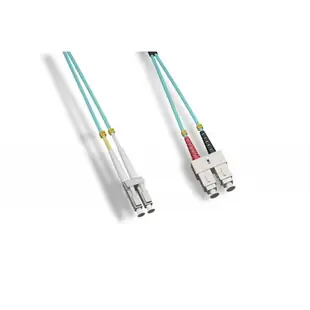
Choosing a 50/125 multimode jumper between two different ports
An LC socket on a switch and an ST receptacle on an older panel may still belong to the same multimode link. Write down the interface at each end separately and read the installed fiber’s OM grade.
How do I avoid ordering a similar-looking single-mode cable?
Inspect the individual model’s fiber specification. Look for the required OM grade and 50/125 marking, then verify polish and duplex or simplex construction. An OS2 item found in a broader browsing section is single-mode and has different fiber geometry. Match the written specification even when the connector photos look alike.
What length should the jumper follow?
Measure from the optical port through the intended fiber manager to the panel. Include the path with the door closed, verify the minimum bend radius and leave enough access to release the connectors later.
Why choose different connectors on the same cord?
A hybrid jumper can link a newer LC optic to an existing SC or ST panel when both sides carry the same compatible optical application. Record which connector goes at the rack and which goes at the panel. This helps someone ordering an emergency spare distinguish a hybrid cable from two identical-ended ones.
Two aqua patch cords can serve different equipment
Read the printed OM grade and inspect both connector ends before comparing lengths. A multimode 50/125 listing can describe a conventional duplex jumper or a breakout assembly built for parallel optics. Check the transceiver specification and installed fiber record for the applicable grade and reach. The LCLC-11001 illustrates a one-meter duplex LC OM2 cord. It cannot replace every other assembly in the 50/125 section simply because the core diameter matches. When servicing two adjacent switches, mark each end with the link identifier and verify the transmit-to-receive path from the site documentation. Include the polish of each end if the replacement uses a different panel connector.
What to compare when a new switch moves the optical port
A replacement switch can relocate its LC cage from the left side of the rack to the right or place it behind a removable module. The old jumper may then be physically too short even though its fiber type and endpoints remain appropriate. Route a measuring cord along the planned path and account for movable panel trays without pushing the fiber against a door. Check whether the new switch uses the same optical application and number of strands before copying the old construction. If the new equipment accepts a different connector, describe each end in equipment-to-panel order. Record any required duplex polarity so a replacement is identifiable from the written schedule. This approach lets you separate a length change from a change of optical mode, pin arrangement or interface.
Compare parts for your setup
LC/UPC to SC/UPC OM4 Duplex 2.0mm Fiber Optic Patch Cord, OFNR, Multimode 50/125 10Gbit, Aqua Jacket, 1 meter (3.3 foot)
LCSC-41001
- Connector references
- LC/UPC · SC/UPC
- Configuration
- Duplex
- Fiber specification
- OM4 · Multimode · 50/125
- Data rate
- 10Gbit
Patch a compatible optical port to a distribution panel within the 1 m route; leave a gentle bend behind each connector.
Match the listed connector designations (LC/UPC, SC/UPC) to both ports, including end-face polish, optical mode and strand arrangement.
Plenum MTP Fiber Optic Cable, Type B, 12 Strand, 50/125 OM3, 40/100 Gbps, MTP Female, 1 meter (3.3 foot)
MPMP-31001
- Connector references
- MTP · MTP Female
- Configuration
- 12 Strand
- Fiber specification
- 50/125 · OM3
- Data rate
- 100 Gbps
Verify OM grade, polarity, fiber count and connector type at both ports. Measure the installed route against this 1 m length.
Plenum Fiber Optic Cable, 40/100 Gigabit Ethernet QSFP 40GBase-SR4 to MTP(MPO)/LC (4 Duplex LC) 24 inch Breakout Cable, OM4, 50/125, 1 meter
MPLC-41001
- Connector references
- MTP · MPO · LC
- Configuration
- Duplex
- Fiber specification
- OM4 · 50/125
- Data rate
- 100 Gigabit


