
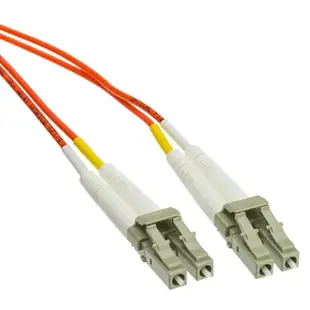
Replacing an OM1 jumper in an older equipment room
Suppose a working switch moves one rack over and its old orange jumper no longer reaches. Capture the printed OM1 or 62.5/125 marking and both connector types while the original assembly is still available.
Do identical connectors guarantee the same fiber?
LC, SC or ST can appear on different fiber types. Match the 62.5-micron core of the installed system and verify whether the equipment uses one strand or a duplex pair. A replacement jumper with a different core size introduces uncertainty into a previously tested route.
How much spare length helps?
Use the path through the rack guides, allowing the equipment to be serviced. The assortment includes very short panel jumpers as well as longer leads. Keep excess cable in its intended management space and record which old port now serves the relocated switch.
Which labels should move with the fiber?
Keep the fiber type, source port and destination port together when updating tags after an equipment move. Color helps locate an orange lead among a rack of cables, but the written identifiers tell staff which OM1 link it actually belongs to and how to replace it.
Match the panel and module even when their sockets differ
An older fiber panel may have SC sockets while the newer optical module on the same OM1 link takes LC. A mixed-end cord can cover this specific difference if the fiber, polish, pair count and optics agree. The ten-meter LCSC-11110 is listed with LC/UPC and SC/UPC ends and OM1 62.5/125 fiber. Verify that both ports actually call for UPC mating surfaces. Measure the installed route through the rack guides instead of applying the panel-to-switch distance directly. Label the cord with both endpoints so the unequal connectors are an intentional part of the maintenance record.
Comparing the two sides of an older cross-connect
In an older building, the engineering drawing may identify the backbone while a handwritten label identifies only the floor. At each panel, note the exact position assigned to the service and ask the fiber technician to confirm the route before assuming every orange lead belongs to the same system. Compare the old jumper’s fiber marking, connector pair, duplex orientation and length. If the fault began after a rack move, include the new cable routing and whether either end was replaced during the move. A damaged patch cord and a mismatch with a newly fitted transceiver lead to different remedies. Keep the selected replacement and the test evidence tied to the affected port IDs. This allows later staff to re-order an OM1 jumper without accidentally copying a nearby OM3 or OS2 link.
Compare parts for your setup
LC OM1 Duplex 2.0mm Fiber Optic Patch Cord, OFNR, Multimode 62.5/125, Orange Jacket, Beige Connector, 0.2 meter (7.8 in)
LCLC-11100.2
- Connector references
- LC
- Configuration
- Duplex
- Fiber specification
- OM1 · Multimode · 62.5/125
- Jacket rating
- OFNR
Patch a compatible optical port to a distribution panel within the 0.2 m route; leave a gentle bend behind each connector.
Match the listed connector designations (LC) to both ports, including end-face polish, optical mode and strand arrangement.
ST/UPC OM1 Simplex Fiber Optic Patch Cord, OFNR/LSZH, Multimode 62.5/125, Orange Jacket, Black Boot, 5 meter
STST-21105
- Connector references
- ST/UPC
- Configuration
- Simplex
- Fiber specification
- OM1 · Multimode · 62.5/125
- Jacket rating
- OFNR · LSZH
Patch a compatible optical port to a distribution panel within the 5 m route; leave a gentle bend behind each connector.
Match the listed connector designations (ST/UPC) to both ports, including end-face polish, optical mode and strand arrangement.
ST/UPC OM1 Duplex 2.0mm Fiber Optic Patch Cord, OFNR, Multimode 62.5/125, Orange Jacket, Red/Black Boot, 1 meter (3.3 ft)
STST-11101
- Connector references
- ST/UPC
- Configuration
- Duplex
- Fiber specification
- OM1 · Multimode · 62.5/125
- Jacket rating
- OFNR
Patch a compatible optical port to a distribution panel within the 1 m route; leave a gentle bend behind each connector.


