
Choosing an optical transceiver or a direct-attach connection
Before buying an SFP-shaped module, note the switch model, port type, supported speeds and software compatibility list. Two modules can slide into similar cages and still expect different data rates or fiber types.
What should I compare at the far end?
Read the full optical designation, wavelength, fiber mode, connector and reach on both modules. A 10GBASE-SR dual-LC multimode optic belongs on a matching optical link. A copper direct-attach assembly, when supported at both ends, connects equipment without a separate fiber patch lead.
Which listings already include an optic?
Some media converters are sold loaded with modules, while an empty SFP slot needs a separately specified module. Read the contents line and compare the switch vendor’s support matrix before assuming a physically compatible part will initialize.
What changes if the two switches are different brands?
Check compatibility at each switch independently and verify that both optical ends use a compatible application. A twinax direct-attach assembly may need support on both host platforms. Keep each switch’s exact model and firmware in the service record alongside the selected optic or cable part numbers.
Compare a removable module with a direct-attach cable
A switch-to-switch order can call for two optical modules plus fiber, or for a supported direct-attach assembly that includes the equipment ends. Identify the slot type and the host vendor’s compatibility information first. The 71F1-41012 is described as a 10G SFP+ short-reach multimode optical module. Compare its optical wavelength, fiber and connector requirements to the remote end. For a direct-attach proposal, check host support on both devices and the intended distance between racks. List the complete working pair on the quote so a box containing one module is not mistaken for a finished link.
Identifying what to replace when only one end has a link light
A link indicator at one end provides a clue, but it cannot select a replacement module by itself. Ask the network technician for the switch port status, module identifications at both ends and any reported optical power measurements. Compare them with the expected fiber mode, port speed and supported reach in the design. If the connection is a direct-attach copper assembly, treat it as one end-to-end part and check host compatibility at both ends. For a fiber connection, preserve the distinction between the two pluggable optics, two local patch leads and the permanent fiber run. An approved service plan can isolate these components without ordering every item at once. Keep the working configuration and any vendor support references with the rack documentation so later spares match the complete link.
Compare parts for your setup
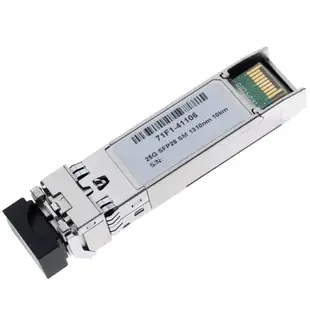
25 Gigabit SFP28 Singlemode LC Transceiver, 1310nm, 10km
71F1-41106
- Connector references
- LC
- Fiber specification
- Singlemode
- Data rate
- 25 Gigabit
QSFP28 100G-SR4100G Optical Transceiver, Multimode. 850Nm, 100m
71F1-41107
- Fiber specification
- Multimode
10G SFP+ Transceiver Module, Singlemode Duplex, 1310nm, 20km Range
71F1-41108
- Configuration
- Duplex
- Fiber specification
- Singlemode


