
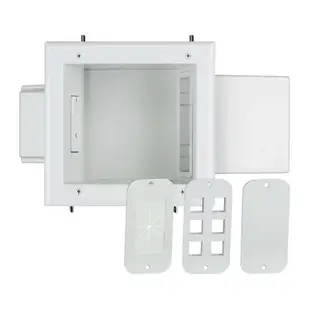
Size a media enclosure for real cables and accessible equipment
A media box can look spacious until power adapters, coax connectors and network patch leads are attached. Make a paper outline of the device, then draw where every cable exits. A small enclosure for passive connections and a cabinet containing powered electronics have different needs.
Will the cover close without pressing on a plug?
Measure the inside depth as well as height and width. Allow room to press a latch, turn a threaded collar and remove a power brick. Check whether the product includes the cover and mounting hardware you need. The listings here include both an enclosure with a screw cover and an expandable media box.
What will need attention after move-in?
Leave access to the modem label, service indicators and reset controls. For active equipment check ventilation, operating temperature and any requirements for a power module approved for the enclosure. Give each room cable a label visible from the front so a future repair does not require removing every module.
Will a large plug block neighboring outlets?
Arrange the actual power adapters side by side before counting outlets as available. A wide power supply can cover a second socket or project into the space needed by the lid. Check the approved module, supply placement and equipment access together rather than adding up their widths independently.
Lay out a media box using the real plugs
A recessed box behind a television may fit the streaming player but leave too little room for its plug-in power supply or the HDMI cable leaving its side. Trace the box's usable interior dimensions on paper, then place the devices and actual connectors on the outline. Mark the path for cable entry, ventilation and removal of equipment. The 80-1500-SC is a 15-inch ABS enclosure with a screw cover. Other listings include a receptacle assembly. Confirm what the specific box includes, how the installer will provide power, and whether each device may operate inside the enclosure. Plan access to reset buttons before hanging the display. Check clearance with the cover fitted and every connector in place.
What happens when a provider replaces the box inside the cabinet?
An installer may fit today's modem or distribution module neatly into a recessed cabinet, only for the provider to deliver a different model a year later. Ask who may open the enclosure, which equipment belongs to the provider and how to reach its service labels in place. Leave a record of the incoming and outgoing cables and any ports reserved for future use. Look beyond the empty space inside: check the door opening, room to remove a module and whether a replacement power supply can be serviced under the original design. If a wireless device will be housed there, test actual coverage with the door closed. If coverage suffers, discuss an accessible alternative position for the wireless equipment.
Compare parts for your setup
ABS Plastic enclosure with screw cover, 15 inch, white
80-1500-SC
- Dimensions in listing
- 15 inch
- Material
- ABS Plastic


