
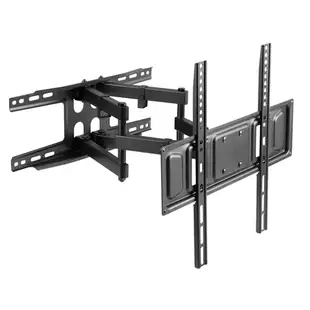
Which TV mount fits my screen and wall position?
The diagonal screen size is only the first measurement. Look up the TV’s weight without its stand, mounting-hole pattern, screw requirements and location of input ports. The catalog lists tilt and full-motion models; a screen that fits the stated diagonal range must also meet the mount’s other limits.
What movement do you actually need?
An articulating arm can bring a screen forward and angle it toward another seat. A tilt mount may suit a fixed viewing position. Make a cardboard outline of the TV and trace the intended swing around shelves, doorways and side walls. Check where the HDMI and antenna leads will flex as it moves.
What should be confirmed before mounting?
Measure the horizontal and vertical distance between the mounting holes in millimeters and compare the exact VESA pattern. Verify the wall construction and permitted installation method in the mount instructions. Where wall support is uncertain, have a qualified installer evaluate it before attaching the TV. Keep the model and manual for future servicing.
Will an existing mount suit a replacement TV of the same size?
Compare both televisions against the mount documentation. The new model can have a different weight, bolt pattern or port position despite an identical diagonal. Check whether the seated bracket obscures the power inlet or connectors before plugging anything in. Keep the original hardware list for comparison.
Compare a tilt bracket and a moving arm in a corner
Place a paper outline of the screen where it would sit when centered, then rotate the outline to the intended viewing angle. A fixed or tilting mount changes viewing geometry differently from an articulating arm. For example, C2032 is described as a tilting mount and C2033 as a full-motion arm. Use the exact TV's weight, hole spacing and rear-panel shape to check the manufacturer's specified compatibility. Include the depth of soundbars, plug heads and nearby shelves. Have the mounting surface and hardware assessed under the manufacturer's instructions. Finally, check how much cable slack the arm needs throughout its intended travel. Mark the screen center at both the parked and extended positions.
How can a mount preserve access for the next service call?
The installer has finished the room, the TV is mounted, and the maintenance team now needs a way to reach the serial number or replace a streaming stick. Ask the installer to demonstrate the mount's normal access and release procedure and identify any manufacturer-required assistance for handling the screen. Take photos of the rear label, port layout and release points while the area is clear. Record the mount model separately from the television model so replacement hardware can be identified later. If the design puts a soundbar in front of the release area, resolve that access before final handover. Keep the supplied instructions with the equipment record, including any limitations on moving or servicing the mounted screen.
Compare parts for your setup
TV Mount for 32 to 70 inch Television w/ 18.4 inch Full Motion Arm, 400x400 max VESA, Black
8212-13262BK
- Video format
- 400x400
- Dimensions in listing
- 70 inch · 18.4 inch
Comzon® TV Wall Mount for 37 to 80 inch TVs, 15° tilt
C2032
- Mounting
- Wall Mount
- Dimensions in listing
- 80 inch
TV/Monitor Fixed Wall Mount fits 37 - 80 inch displays, max weight 77 pounds, VESA 600x400
8212-13263BK
- Video format
- 600x400
- Mounting
- Wall Mount
- Dimensions in listing
- 80 inch


