
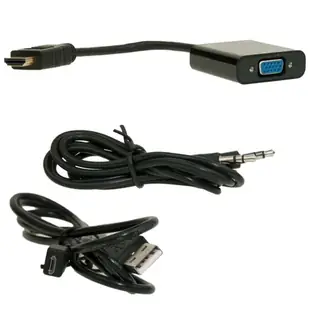
Send HDMI video to a VGA projector with separate audio
The converter here has an HDMI male source end and a VGA female destination end. It can bridge a digital HDMI source and compatible analog VGA display. A computer with VGA output feeding an HDMI-only TV is the reverse task and needs a converter explicitly intended for that direction.
What additional cables will the setup need?
Check the connection between the converter’s female VGA socket and the screen. You may already have a VGA cable permanently routed to the projector. The listing also specifies USB power and stereo audio support. Plan those connections according to the part instructions and the sound system at the destination.
What if the projector shows no image?
Select the projector’s VGA input and use a resolution it actually lists. The converter’s stated upper limit does not imply every older projector can accept that mode. Try a familiar desktop presentation first. Then check sound on the separate audio path before starting a video with an audience present.
Will the adapter make an old projector widescreen?
The projector still determines which image shapes and resolutions it can display. If slides are cropped, use the projector’s supported aspect ratio and check scaling on the source. A correctly functioning converter can deliver a picture that still needs presentation settings adjusted for the older screen.
Give a training room both picture and speech
A trainer bringing an HDMI laptop to a room with an older VGA projector needs to plan audio as well as the screen image. The 40H1-31410 lists an HDMI male input-side connector, VGA female connection, stereo audio support and USB power. Check where the room's audio system accepts a signal and whether you have the required VGA, audio and power leads. Plug in a presentation with spoken content and choose the intended source on the projector. Using a known speech track makes it easy to tell whether the sound is coming from the room or the laptop itself. Document that working setup for the next instructor. Include the audio input selection when writing the instructor's quick setup notes.
What makes slide text readable on an older TV?
A converter can produce a stable desktop picture while the edges of a spreadsheet or presentation remain cropped. Set the computer to a resolution and refresh rate that the display and converter both support, and check the TV's picture-size or overscan controls in its manual. Use a test slide with a border around the entire image and small labels in all four corners. View it from the farthest seat, then try the actual spreadsheet or training software. If the border is visible but the text is too small, changing the application zoom or presentation layout may do more than replacing the converter. Save the successful computer mode, TV input and picture setting on the room's instruction sheet for the next user.
A closer look at this part
HDMI male to VGA female Adapter with Stereo Audio Support, Up to 1080P 1920 x 1080, Powered by USB Port
40H1-31410
- Connector references
- HDMI male · VGA female
- Video format
- 1080P · 1920 x 1080
