
Choose a USB wall adapter for the cables you already own
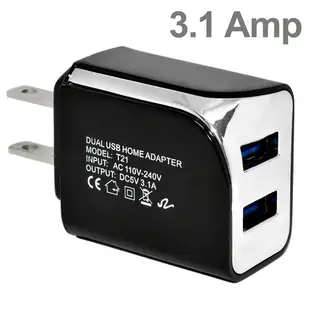
A drawer full of USB cables can still leave you short of a power source. Check the plug at the wall-adapter end of each cable first. The two-port USB-A travel charger listed here accepts rectangular USB-A plugs and specifies a total output shared by the ports.
What will you charge together?
A phone and a small accessory may have different recommended inputs. Read their charging specifications and the adapter’s total output before planning to connect both. Check available space around the wall outlet if a second plug or bulky device already occupies the adjacent socket.
USB charger or equipment power supply?
If your replacement is for a router or another device with a round DC inlet, identify the manufacturer’s specified voltage, polarity, current and barrel dimensions. A USB wall charger in this section is a separate product type. Keep a photo of the original power label for that search.
What to check before taking a charger abroad
On the travel list, note the charger’s printed AC input range and the wall plug type used at the destination. A plug adapter changes the physical connection to an outlet. It does not establish that the charger accepts the local supply. Check the original charger label and the device maker’s instructions before deciding what to carry. For a hotel desk shared with a laptop, also check whether the charger’s body leaves the second outlet accessible. This modest detail can determine whether a two-port charger actually saves space or blocks the socket you needed for the computer.
Clearing a crowded outlet behind the nightstand
Count the charging cables already in use. The 90W1-41000WH offers a USB-C port and a USB-A port, while the 90W1-30320BK offers two USB-A ports. That distinction matters if you want to keep a particular cable or charge a phone and a watch together. Check the output available to each device when both ports are occupied, and compare it with the devices' own charging instructions. A wattage printed on the front can describe a combined maximum. Measure the space behind the furniture with the cables plugged in so the charger can sit without pressure on its plugs.
Powering a device that stays plugged in at a counter
A USB-powered sign or clock at a counter may already have a long cable routed through the furniture. Before replacing its wall adapter, find the device’s required input and check the cable and connectors for damage. Test the device and its original configuration using the maker’s recommended procedure. Then compare a short known working cable, if compatible, before ordering a higher-output adapter. A poor connection along the existing run can mimic a weak source. Look at whether the proposed supply stays accessible behind the counter and has a suitable rating for the intended use. Keeping the installed cable length in the purchase note helps explain the full setup.
Compare parts for your setup
2 Port USB Wall Travel Charger, 2 USB A Charging Ports, 3.1 Amps total, Black
90W1-30320BK
- Connector references
- USB A
- Current rating
- 3.1 Amps
- Port count
- 2 Port
2 Port USB Wall Travel Charger, USB C w/ USB PD 3.1A, USB A /w QC3 3.1A, 36W, White
90W1-41000WH
- Connector references
- USB C · USB A
- Power rating
- 36W
- Port count
- 2 Port
2 Port USB Wall Travel Charger, 2 USB A Charging Ports, 3.1 Amps total, White
90W1-30320WH
- Connector references
- USB A
- Current rating
- 3.1 Amps
- Port count
- 2 Port


