
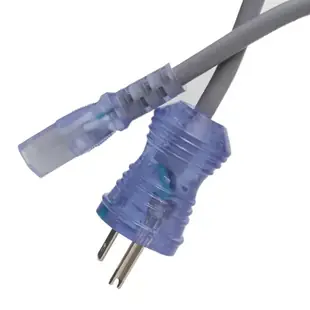
Identify a replacement hospital-grade cord by its specification
For a facility purchase, start with the approved equipment model and purchasing specification. A green dot can help identify a plug type, while the full cord set still needs to match the device inlet, current rating, length and facility requirements.
Compare the complete cord set
The listings include NEMA 5-15 to C13 configurations. Record the required voltage and current, conductor gauge and jacket designation from the equipment documentation. Check both ends against the existing approved cord and compare the replacement part number with the purchasing record.
Allow for carts and storage
Measure the working route from equipment mounted on the cart to the intended outlet and how the cord will be stored between uses. Have clinical engineering or the facility’s designated reviewer confirm suitability for the specific equipment and environment before the cord enters service.
A replacement for one device versus a fleet purchase
Two carts from the same department can carry equipment with different appliance inlets, loads or approved cords. For a routine fleet replacement, ask the facility reviewer for the exact equipment models covered by the approved specification. Compare a representative unit from each model group with the proposed cord set. Include any right-angle requirement, clearance for a retaining clip and the length the service procedure permits. Once the reviewer approves a combination, keep the device model and cord part number together. That record is more dependable for the next purchase than describing every cord on the floor as a white or green-dot cord.
Replacing a cord on an equipment cart
Use the equipment maker's replacement specification and the facility's service procedure. Two green-dot cords can share a wall plug and C13 connector yet carry different ratings. The 10W1-51006 is listed at 10 amps, 125 volts and 18 AWG. The 10W2-51306 is listed at 13 amps, 125 volts and 16 AWG. Record the required rating, length, connector and approval marks before identifying the part to purchasing. A green dot on the plug alone does not establish suitability for a particular medical device or facility. Have the responsible equipment team confirm the replacement.
What information belongs on an equipment handoff?
If a piece of equipment moves from one department to another, send its approved power-cord information with it. Record the device asset identifier, cord part number, specified length and any retention hardware the receiving team must keep. Ask the facility’s responsible reviewer whether the equipment may move between the intended environments with that cord set. A short cord appropriate on a fixed shelf may create a different routing problem on a moving cart. Having the approved information available before the move lets the receiving team request a suitable documented replacement rather than borrowing a cord solely because its plug fits the inlet.
Compare parts for your setup
Hospital Grade Green Dot Power Cord, Nema 5-15 to C13, 18 AWG, SJT, 10 Amp / 125 Volt, 6 foot
10W1-51006
- Connector references
- Nema 5-15 · C13
- Current rating
- 10 Amp
- Voltage
- 125 Volt
- Wire gauge
- 18 AWG
Trace the 6 ft route from the actual supply outlet to the equipment inlet, allowing room behind the chassis.
Match the connector markings (Nema 5-15 · C13) and electrical ratings at both ends before ordering.
Hospital Grade, Green Dot, Power Cord, Nema 5-15 to C13, 16 AWG, SJT, 13 Amp / 125 Volt, Black, 3 Foot
10W2-51303BK
- Connector references
- Nema 5-15 · C13
- Current rating
- 13 Amp
- Voltage
- 125 Volt
- Wire gauge
- 16 AWG
Trace the 3 ft route from the actual supply outlet to the equipment inlet, allowing room behind the chassis.
Hospital Grade, Green Dot, Power Cord, Nema 5-15 to C13, 14 AWG, SJT, 15 Amp / 125 Volt, 3 Foot
10W2-51503
- Connector references
- Nema 5-15 · C13
- Current rating
- 15 Amp
- Voltage
- 125 Volt
- Wire gauge
- 14 AWG


