
Match both ends of a replacement equipment power cord
A monitor power cord is easy to replace once you know what supplies power and what receives it. Photograph the wall plug or power-distribution outlet and the inlet on the equipment. Record voltage and current from the equipment documentation.
Wall outlet, power strip or rack PDU?
A NEMA 5-15P to C13 cable and a rack jumper can end at the same style of equipment inlet and start at different outlets. The assortment also contains DC connectors, which require their own voltage, polarity and physical-size checks. Compare each end with the drawings on the part page.
How much length is useful?
Measure around the furniture, arm or rack rail and check the cord rating for the chosen length. At a workstation on wheels, allow for its normal movement without pulling the equipment inlet. Keep the manufacturer’s cord requirements with the purchase record for future replacements.
Look closely at the equipment end on a hot spare
If the replacement must also work with a spare machine, inspect the inlet on the spare itself. Similar-looking equipment from different revisions can use different inlet shapes or have a retaining bracket that changes which plug body will seat completely. Compare the connector markings, the shape around the inlet and the maker’s required cord rating for each device. Where the two approved cord specifications differ, keep the spares individually labeled. This matters on a rushed service call, when a familiar black plug in the spare-parts drawer may seem interchangeable until the equipment is already out of its rack.
A replacement cord for a rack monitor
Photograph the equipment inlet and the outlet that will actually feed it. A computer-style C13 cord might be expected at the monitor end while the power source is a rack PDU with a different socket from the wall receptacle. The 10W1-01201 is a short NEMA 5-15P to C13 cord with a listed 10-amp rating. The 10W2-01206 has the same general endpoints but a different length and listed rating. Start with the monitor's requirements, then check the printed cord and source ratings. A short run also needs enough slack to remove the monitor for service.
Replacing the cord after a move to a different country
A desktop or display brought from another country can have the correct equipment inlet and a wall plug that does not fit the new location. Check the equipment’s specified AC input voltage and frequency and the maker’s guidance for that region before selecting a cord set. A cord that fits the local outlet changes only the connection and must also meet the equipment’s rating. It cannot convert the electrical supply. If the equipment requires a different supply or a documented selector setting, follow the manufacturer’s instructions or have the responsible technician evaluate it. Keep the regional specification with the replacement order for future staff.
Compare parts for your setup
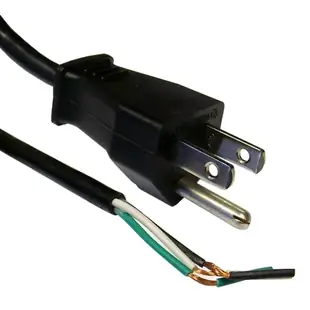
NEMA 5-15P to Standard ROJ Power Cord, Black, 18/3 (18AWG 3 Conductor) SVT, 10 Amp / 125 Volt, 6 foot
10W1-10106
- Connector references
- NEMA 5-15P
- Configuration
- 3 Conductor
- Current rating
- 10 Amp
- Voltage
- 125 Volt
Check both ends and the printed electrical ratings; an unfinished equipment end requires the specified assembly process. Measure the installed route against this 6 ft length.
Black NEMA 5-20P TO IEC-60320-C13, 14/3, UL Listed, SJT, 6 foot
10W2-01306
- Connector references
- NEMA 5-20P · C13
- Jacket rating
- SJT
- Dimensions in listing
- 6 foot
England / UK Notebook/Laptop Power Cord with Fuse, BS 1363 to C7, Non-Polarized, VDE Approved, 6 foot
10W1-23406
- Connector references
- C7
- Length
- 6 ft
Trace the 6 ft route from the actual supply outlet to the equipment inlet, allowing room behind the chassis.
Match the connector markings (C7) and electrical ratings at both ends before ordering.


