
Which FireWire cable will get an old camera or drive talking to a Mac?
A box of MiniDV tapes and a camcorder that still plays them can be the start of a family archive. A cable purchase makes sense once you know that the camera can send the recording and the Mac can receive it. FireWire, IEEE 1394, DV and i.LINK are names you may encounter while matching the equipment. The model, connector at each end and software on the receiving Mac determine the next step.
What should I check before buying a FireWire cable?
Start with the Mac you intend to use. Apple's current port guide says FireWire connections on a Mac require macOS Sequoia 15 or earlier. Check About This Mac for the installed version, then look up the exact Mac’s ports. A USB-C socket on a newer machine does not establish a working FireWire connection. If the Mac or its software cannot support the equipment, borrowing a compatible older setup for the import may save you from buying an entire chain of adapters.
How do I choose between four, six and nine pins?
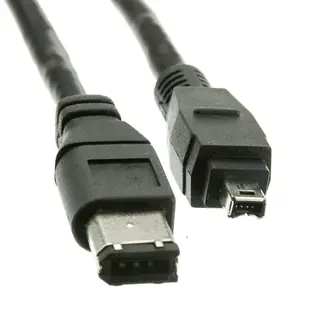
Inspect the camera and computer independently, using the port illustrations in their manuals. The 10E3-02106 is a six-foot cable with six pins at one end and four at the other. It is a candidate when an older Mac has a six-pin FireWire 400 socket and the camera has four-pin DV. A 10E3-01106 joins two six-pin ports. The 10E3-99003BK is a three-foot nine-pin cable for two FireWire 800 sockets. A different pin count calls for a different combination even when both devices say FireWire.
How do I plan a tape transfer?
Check the camera's playback instructions and locate its power adapter or a charged battery. A four-pin i.LINK connection carries no power for the camera. Put the camcorder in its playback mode, select the correct camera in compatible capture software and start with a short test. Listen to the captured clip and check the picture before committing to a box of tapes. Apple's iMovie guide explains that a supported tape imports as it plays. A one-hour recording therefore deserves an hour on the schedule, plus time for checking and saving the result.
What if the old device is a hard drive?
Read the enclosure's model and check how it receives power. A missing external power supply is a separate problem that another data cable cannot solve. Follow the manufacturer's connection sequence. Once a readable volume appears, copy a small file to another drive and open the copy. If the system offers to erase a disk that contains your only archive, cancel that operation and identify the format before proceeding. An older computer that previously read the drive can be a useful reference.
Should I choose a longer lead for my setup?
On a transfer bench, keeping the Mac, camera and power supplies close can make a short cable easier to secure. Leave enough slack to reach the camera controls without moving the plug. If tape import stops when the camera is touched, inspect the fit and strain on both sockets before assuming a faster cable is the answer. Keep the working cable, camera power adapter and details of the successful setup together for the next tape.
Compare parts for your setup
Firewire 400 6 Pin to 4 Pin cable, IEEE-1394a, 6 foot
10E3-02106
- Configuration
- 6 Pin · 4 Pin
- Length
- 6 ft
Connect a MiniDV camcorder with a four-pin DV socket to a computer with a compatible six-pin FireWire interface.
Check the camera and host ends separately. A USB-only computer needs a compatible capture or FireWire interface.
Firewire 400 9 Pin to 6 Pin Cable, Black, IEEE-1394a, 6 foot
10E3-96006BK
- Configuration
- 9 Pin · 6 Pin
- Length
- 6 ft
Compare the 4-, 6- or 9-pin port at each end and verify that the computer supports FireWire capture. Measure the installed route against this 6 ft length.


