
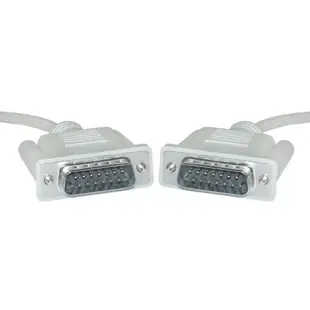
Finding a monitor or serial cable for a classic Macintosh
Imagine unpacking a Macintosh LC, a matching monitor and a shoebox of cables from an old design studio. Several plugs have retaining screws. Two little round connectors can almost cover each other in a photograph. Start by putting a note beside each device with its exact model and the port you want to use. Classic Apple equipment had separate connections for video, printers, modems, disks and keyboards. The purpose of the port is the first clue to a working replacement.
Which 15-pin monitor cable fits an older Mac?
Look straight into the connector to count rows as well as contacts. The classic Mac monitor connector commonly sold as Apple DB15 has two rows. A familiar VGA monitor plug has three rows of five. One useful reference is Apple's specification sheet for the Macintosh LC. It identifies its video output as DB-15 and lists a separate DB-25 SCSI port. If a listing says only “15-pin monitor cable,” ask for a clear front view before trusting that description.
Do I need two male ends or a monitor extension?
If both the Mac and the monitor have mating sockets, a cable with the correct plug on each end may complete the run. The six-foot 10D2-01106 is the male-ended Mac monitor cable in this category. If the monitor already has a lead permanently attached, its free plug has nowhere to go on a second male-ended lead. The 10D2-01206 is a six-foot male-to-female monitor extension. Beyond physical fit, confirm that the Mac can produce a video mode the monitor accepts. Its resolution and timing requirements still apply to a cable that fits neatly.
What does an eight-pin round serial plug tell me?
It gives you a connector family. The eight-pin Mini-DIN Apple serial lead 10M3-04106 and the male-to-female serial extension 10M3-04206 serve different physical setups. A cable identified for a Hayes modem introduces a DB25 end for that peripheral. A DB25 socket on the Mac itself may belong to SCSI storage. Read the small printer, modem or other symbol beside the port and check the peripheral manual for wiring. A matching number of pins alone cannot identify a serial modem connection.
How do I work with a cable drawer full of unknowns?
Photograph both ends beside each other with the contact faces visible. Take a second photo showing the whole cable, including any switch box, inline adapter or label. Record whether the monitor lead detaches and where the original setup used an extension. If you are restoring a working system, label the known-good cable before removing it. That gives you a reference to return to as you try one substitute at a time.
Which details will help someone identify my part?
Send the model from the computer, the model from the peripheral and what you want to achieve, such as driving the original display or reconnecting a serial printer. Include the row count, which ends have pins, the approximate route length and any part number stamped on the old lead. If you want to connect a modern HDMI screen instead, say so up front. That brings signal conversion and supported display modes into the conversation before you buy another analog extension.
Compare parts for your setup
Apple/Mac Monitor Cable, DB15 Male, 15 Conductor, 6 foot
10D2-01106
- Connector references
- DB15 Male
- Configuration
- 15 Conductor
- Length
- 6 ft
Match the Mac model, port function, pin count and wiring to the peripheral’s documentation. Measure the installed route against this 6 ft length.
Apple Serial extension cable, MiniDin8 Male to MiniDin8 Female, 8 Conductors, 6 foot
10M3-04206
- Connector references
- MiniDin8 Male · MiniDin8 Female
- Configuration
- 8 Conductors
- Length
- 6 ft
Apple Serial cable, MiniDin8 Male, 8 Conductor, 6 foot
10M3-04106
- Connector references
- MiniDin8 Male
- Configuration
- 8 Conductor
- Length
- 6 ft


