
Getting analog audio from an older CD-ROM drive
A vintage PC can read a software disc perfectly and still fall silent when you play a music CD. On a system designed for analog CD playback, the missing piece can be the little lead between the drive and the sound card.
Which header is on the sound card?
Look up the drive’s audio-out drawing and the sound card’s CD-in drawing. Compare their pin order, connector width and key with the Sound Blaster-to-MPC2 lead listed here. A matching number of holes alone leaves room for a mismatch. The wide ribbon and the drive power plug serve different jobs.
Trace the playback path
Measure between the two headers along the route the lead can take inside the case. If the computer uses digital extraction for CD playback, first check the player’s output device and volume. Buying an internal analog audio lead makes sense when the system actually uses that path.
Check the mixer before opening the PC
A useful comparison on a period-correct machine is a sound file from the hard drive followed by a music CD in the optical drive. If both are silent, first examine the speakers or headphones, selected output and master volume. If only the CD is silent, look for the CD input level in the sound card’s mixer and identify how the player is configured. Some vintage drives also have a headphone jack and volume wheel on their front panel. Where the manual supports it, playback there can establish whether the drive itself is producing audio before you buy an internal lead.
The CD spins and files open, but an audio CD is silent
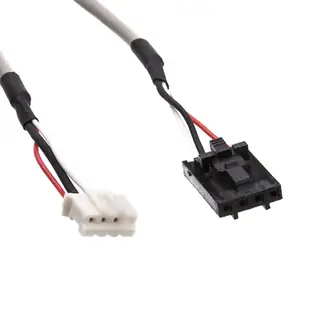
Try an ordinary sound file through the same speakers first. If that works, identify how your playback software reads the disc. Older setups could route analog CD audio from the optical drive to a separate sound card. The 11A1-11418 is an eighteen-inch Sound Blaster to MPC2 audio lead for that type of path. Check the keying and header labels at both ends before ordering. A machine already using digital audio extraction has a different playback path. Save a photo of the drive model and the sound card together so the original routing is easy to reproduce.
Which disc makes a useful test?
An ordinary audio CD and a data CD full of music files follow different playback paths on many older PCs. Choose a known audio disc that the original machine once played and check how the operating system identifies it. If the player lists ordinary audio tracks, you have a more useful reference for investigating the analog route. A disc that opens as a folder of MP3 files tests a software player reading files instead. When ordering a lead for a restoration, include the optical drive model and the audio program used in the original setup. That detail can explain why the same disc behaves differently in two period machines.
A closer look at this part
CD Audio Cable, Sound Blaster to MPC2, 18 inch
11A1-11418
- Length
- 18 in
Compare the drive connector and the sound card header, including pin order, against the equipment manuals. Measure the installed route against this 18 in length.
