
Choosing computer accessories for a desk with new and older equipment
A working monitor, keyboard or set of speakers can outlast several computers. The snag arrives when the new machine has a different port, or when you want to share the equipment between two desks. Sketch the setup before searching for an adapter. Write down the computer model, the device you want to keep and which part of the setup someone needs to switch, hear or see. Each answer points to a different part of this department.
Can two computers share one keyboard, mouse and monitor?
A KVM switch can handle those three connections when its ports match the equipment. Count the cables from each computer to the switch, then count the connections from the switch to the shared peripherals. An older bundle such as 10H1-30106BK combines an HD15 video plug with two Mini-DIN 6 plugs for PS/2 peripherals. That bundle is a cable for a compatible setup. Buying it alone does not add switching. A modern laptop may need a different switch, USB peripherals or a dock with a verified video output. Check the monitor’s intended resolution before choosing the path.
Which side of the display connection am I adapting?
Read the monitor’s input labels and the output markings on the computer. A full-size DisplayPort socket and a USB-C socket are easy to distinguish in a photograph, but USB-C video support needs confirmation from the computer documentation. If the machine is under a desk, photograph its usable graphics outputs rather than guessing from a chassis photo online. A docking station between computer and monitor adds another set of limits. Check the dock model and cable as well as the graphics hardware, especially when two external displays are planned.
Why does a front-panel or internal cable need a closer look?
An internal header uses the board’s pin layout and orientation. The dual USB-A slot cover listed as 31U1-02408 routes to a motherboard header, so the board must have the correct connection available. Record the board model and header label, and check whether a case accessory already occupies it. Older optical drives have their own surprises. The 18-inch 11A1-11418 is an internal CD audio cable with specified audio ends. Someone replacing the cable used to read discs needs the drive’s data interface instead. Explain the symptom and the job of the original lead.
What makes an accessory useful once it reaches the desk?
For video calls, decide whether you need the webcam’s built-in microphone or a separate headset. Select the intended input in the conferencing app and test it from the chair where you usually sit. For wall plates, count the open positions and check the insert style. For keyboards, mice and speakers, allow room to reach plugs after everything is in place. Keep a photo of the finished connections with the model and part numbers. It gives the next person a reliable starting point after a desk move.
Compare parts for your setup
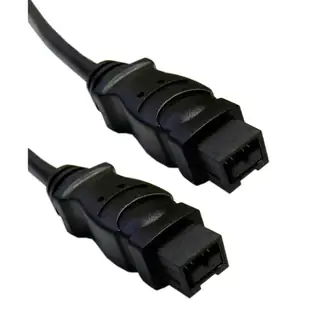
Firewire 800 9 Pin cable, Black, IEEE-1394b, 3 foot
10E3-99003BK
- Configuration
- 9 Pin
- Length
- 3 ft
Compare the 4-, 6- or 9-pin port at each end and verify that the computer supports FireWire capture. Measure the installed route against this 3 ft length.
ST/ST Simplex Keystone Adapter with Metal Housing, Fiber Optic Coupler, White
30ST-ST400
- Connector references
- ST
- Configuration
- Simplex
- Material
- Metal Housing
Cat5e Duplex Surface Mount Box, Unshielded
300-313DE
- Configuration
- Duplex
- Ethernet category
- Cat5e
- Mounting
- Surface Mount


