
Add a rear USB port or replace a desktop keyboard
One upgrade uses a vacant slot at the back of a PC. Another only needs a free outside USB port. Decide where you need the connection before shopping this small assortment of desktop accessories.
What does a USB slot bracket need?
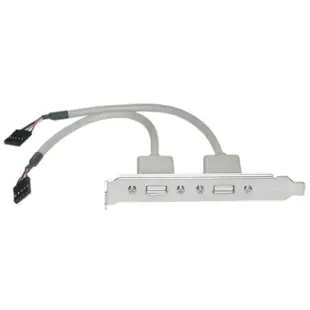
The dual Type-A bracket routes two sockets to a motherboard header. Check the board manual for a free compatible header and compare the internal plug, key and bracket height. A case with an empty opening can still have every suitable motherboard header occupied by front-panel wiring.
Will a full-size keyboard fit?
For the 104-key USB keyboard, allow room for the number pad, mouse travel and the cable exit. If the real goal is reaching the keyboard from a standing desk, measure the cable path with the desk raised and the monitor arm in its usual position.
Choose the upgrade for the device you move most
Consider a desk with a USB keyboard that stays put, a thumb drive that comes and goes, and a webcam that needs a little space around its plug. Permanent peripherals can use rear connections and leave a front socket open for the drive. Before adding the bracket, check whether relocating the keyboard frees the one accessible port you actually need. If the new bracket makes sense, label the rear ports and keep a note of the motherboard header used. Someone replacing the case or reconnecting the front panel later can use that record to restore the original arrangement.
Adding rear USB sockets to an older tower
A free metal slot at the back of a tower gives a bracket somewhere to sit. To make its USB ports work, you also need a compatible, available motherboard header. The 31U1-02408 carries two external USB-A sockets to an internal header. Check the motherboard diagram for the header positions and verify that the front-panel cable hasn't already claimed the only suitable one. Measure from the rear slot to the header around any installed cards. Once fitted according to the computer manual, try the same known-working USB device in each socket before placing the tower back under the desk.
Does the keyboard need to work before the operating system loads?
A replacement keyboard for a repair bench sometimes has to operate the firmware setup menu or a boot selector before the desktop appears. Check the computer manual for the port it recommends for that job and whether the proposed keyboard connection is supported at startup. With one sample unit, restart normally and test the actual key sequence your technicians use. Also verify the everyday functions after the operating system loads. A keyboard that types documents correctly can still leave an unanswered question about startup support through a particular hub or bracket. Write down the working port location with the keyboard model for the next shift.
Compare parts for your setup
USB PC Expansion Slot Cover, Dual USB Type A Female Ports to Board Header
31U1-02408
- Connector references
- USB Type A Female

