
Find the right power lead inside a desktop case
A spare drive can fit in the bay while its power plug ends up just beyond the nearest harness. Photograph the drive inlet and the available device-side power connector, then measure the path around the drive cage with the cover closed.
Which end changes?
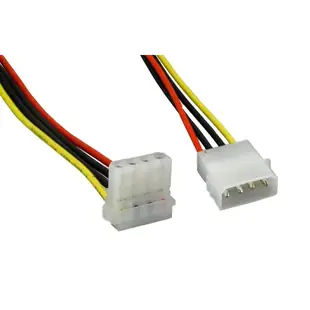
An LP4 extension continues the larger four-position connection. A floppy power adapter finishes in a smaller plug. A right-angle end changes the direction in which the wires exit. Use the drive’s connector drawing and the free space behind it to choose among these different jobs.
Follow the power supply documentation
For the detachable harness that plugs into a modular power supply, use the exact cable specified for that power supply model. The extensions shown here serve the device end. Keep the new run away from fans and allow the connector to seat fully without pressure from the case lid.
Leave space for the drive tray to move
A cable can reach its destination when the case is open and pull tight when you slide the tray back into its normal position. With the equipment off and following the case manual, measure the path in the position in which the drive will actually run. Think about the next service visit too. Can the tray be released and the plug reached without levering it against the disk? Compare the direction of the elbow with the orientation of the device in this particular case. Rotating the drive in another bay can make the same right-angle connector point the other way.
The new drive has data but still needs power
Trace the two connectors separately with the system off and unplugged, following its service manual. An internal SATA data lead runs to the controller. A second connection supplies power. The 31SA-006P is an LP4-to-two-SATA-power adapter, so it addresses the latter part of a compatible setup. Review the supply's available power and its documented connections before adding another drive. Photograph cable routing before closing the case and keep wiring clear of fans and side panels. If the drive fails to appear later, that photograph can save reopening the case just to identify which adapter you bought.
A spare connector may belong to a different harness
When a used computer arrives with a bag of spare modular cables, check the power supply model inside the computer and the source of each spare. A donor system may have left behind a detachable lead that resembles the original. Ask the power supply maker to confirm compatibility for the exact cable and model before using a spare on the power supply side. If the existing device-side harness is intact and only a little short, document where that harness ends and compare the extension needed there. Keeping the two purchases distinct avoids ordering a replacement modular harness for a job that only requires more reach at a drive.
Compare parts for your setup
5.25 Male (LP4) to 5.25 Right-Angle Female (LP4) Internal Drive Power Cable, 8-inch
11W3-04308
- Connector references
- LP4
- Configuration
- Internal
- Length
- 8 in
ATX 20-pin to 24 pin Computer Power Adapter, 20-pin Power supply to 24-pin Motherboard, 6 inch
11W3-07206
- Configuration
- 20-pin · 24 pin · 24-pin
- Dimensions in listing
- 6 inch
4 Pin Molex Cable, 5.25 inch Female to 5.25 inch Female, 12 inch
11W3-04412
- Configuration
- 4 Pin
- Dimensions in listing
- 5.25 inch
- Length
- 12 in
Identify the function, connector keying, available clearance and, for power splitters, the supply’s load limit. Measure the installed route against this 12 in length.


