
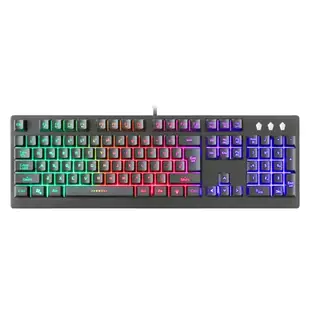
Will a 104-key desktop keyboard suit your setup?
The listing here is a wired USB keyboard with a full number pad. That layout helps with invoices and spreadsheet entry, but its width matters on a narrow tray shared with a mouse. Measure the usable tray width before ordering.
Check what you use every day
Compare the photos for key layout, Enter key shape and legends you rely on. Confirm an available USB port and the route to it with the keyboard tray extended. For shared workstations, consider whether the lighting controls and key labels will be easy for the next user to recognize.
Replacing a different input device
For a failed mouse, inspect its own plug and model before using the keyboard listing as a reference. For an older round keyboard plug, head to the DIN or PS/2 sections and match the pin layout on both the computer and keyboard.
Replacing the keyboard at a bilingual workstation
Key count does not establish the language printed on the keycaps or the keyboard layout selected in the operating system. If you regularly enter accents, punctuation or shortcuts in two languages, photograph the keys you use and compare them with the product image. Ask about the printed layout when that image is shared across a product family. After installation, type a short sample into a blank document and verify that the characters match the layout you selected. If the physical key works but produces an unexpected character, review the software’s input language before assuming the new keyboard is defective.
Replacing the front-desk keyboard without changing the workflow
Ask the person at the desk to show you the sequence they repeat most often. A cashier may enter numbers on a keypad while a receptionist uses function keys in appointment software. The 5012-80107 is a 104-key USB keyboard with RGB lighting. Check that its layout suits the desk, that the USB connection is accessible and that lighting is acceptable in the room. If a particular function key matters, try it in the actual application. A key that works in a text editor says little about shortcuts assigned by the program staff use all day.
Does the USB cable reach a sit-stand desk at full height?
On a sit-stand desk the keyboard can stay in the same spot on the tabletop while its distance from a floor-mounted computer changes significantly. Measure from the keyboard’s cable exit to the intended USB socket at sitting height and again at standing height. Follow the route through any tray or clips rather than measuring vertically. Slowly move the desk through its normal travel and see where slack is taken up. If an extension appears necessary, include the space for its connection and choose a location where that joint will not catch. This is also a good time to decide whether a computer mounted to the moving desk would simplify the route.
