
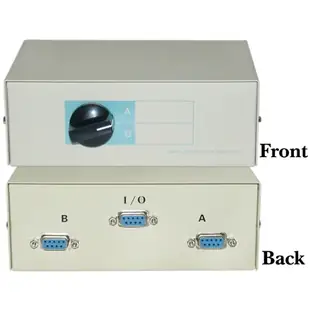
Choose an A/B switch for a shared peripheral
If two machines take turns using one peripheral, draw the three endpoints on paper. Mark the common connection and the two selectable branches. Count the ports you need and note who should be able to switch between them.
Match the signal as well as the socket
These boxes come in styles such as DB9, DB25 and BNC. Look up the interface used by your equipment and check the switch’s supported function and wiring. Matching DB25 shells can turn up on serial and parallel equipment. A switch for selecting one path also differs from a splitter for simultaneous operation.
Count the connecting cables
Check the gender of every socket on the box. A workbench with two machines and one shared device may need three leads even when all the boxes line up neatly. Label branches A and B with the actual machine names to simplify handoffs.
Can the equipment safely be switched during use?
Before putting a selector where several people can reach it, check whether both devices permit the connection to be switched while a job is active. A printer receiving a long job or a serial device sending a file may still need the selected path after the first characters appear. Decide who will change the selector and how they can tell the transfer has finished. Label the common connection as well as the two branches. If the workflow calls for both machines to use the peripheral at the same time, document that requirement before considering a manually operated A/B box.
Sharing a bench instrument between two workstations
Identify what the instrument sends over its connector. The 40D1-10602 is a two-position box with DB9 female sockets. The 40R2-01604 offers four positions with RJ45 sockets. That rectangular modular shape alone does not make a manual selector an Ethernet network switch. Confirm the signal, required pins and permitted switching procedure in the instrument manual. Label the common socket with the instrument name and each selectable position with its workstation. If one position works and the next does not, move the known-working cable to that position for the next comparison.
A switch behind the desk still needs a readable position
Imagine a selector under a workbench where its A/B markings face the wall. Before deciding on the shortest set of connecting cables, choose where the person operating it can see or feel the selected position and reach it without disturbing plugs. Check the product dimensions with the cables attached on all occupied sides. A shallow box may become much deeper once two screw-fastened connectors project from the back. Use a paper outline of the box and its cable exits to compare possible mounting points. Then measure the runs from that location to each machine and the common device.


