
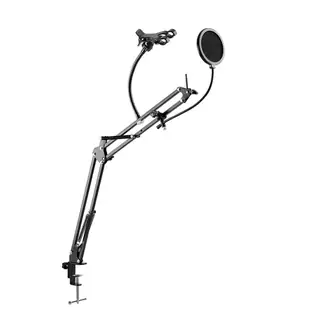
Do you need a webcam or a mount for your phone?
Two desk setups can produce the same head-and-shoulders view. A USB webcam supplies a camera to the computer. A stand with a phone holder and pop filter positions equipment you already own. Read the item description for what actually comes in the box.
Check the video and audio inputs
For the webcam with a built-in microphone, select that camera in your meeting program and record a short sample. Select the microphone separately if the laptop still uses its own. Check application permissions if another program can see the camera but the meeting software cannot.
Position a phone before you buy the stand
Check clamp range against the phone with its case fitted. Measure the available desk space, where the lens sits and whether the charging plug clears the holder. A stable support solves framing, while the phone and its software must supply the connection to your recording application.
When the view is right but your face is hard to see
A webcam above a bright window can leave the speaker in silhouette even though the USB connection and meeting software are working. Before replacing the camera, try the same call with the desk lamp lighting your face and the window outside the camera’s direct view. Check the preview at the time of day you normally meet. If you are considering a phone stand instead, compare the height of its lens with the webcam position while seated. A mount that puts the phone below the screen changes where you look when reading notes or speaking to the person on the call.
Is the missing piece a camera or a mount?
If the picture from your phone looks good until you try to demonstrate a repair with both hands, the missing component may be a stable mount. The 8190-00026 is described as a desktop microphone stand with a rotating phone holder and pop filter. The phone supplies the image. Measure the phone with its case attached and check the mounting and orientation details. Before recording, set up the actual workpiece, move both hands through the frame and listen for vibration transmitted through the table. That trial reveals issues a connector photo alone cannot show.
Frame a whiteboard as well as the person speaking
For a tutoring session, the camera might need to show a face for introductions and a whiteboard during the lesson. Place a temporary marker where the lens would sit and check the board’s edges, reflections and text size in the meeting preview. Ask a remote participant to read one short line written at normal size. If the words are legible only when the camera is closer, consider whether you can reposition the camera, move the board or use a separate document view. This practical test tells you more about the needed mounting position than a resolution label viewed in isolation.

