
Finding the right cable to get photos or video off an older camera
A box of family photos or a tape from a school performance can suddenly make a missing camera cable important again. First decide what you are trying to retrieve. Photographs on a removable memory card, files in a camera’s internal memory, and video recorded on tape may take different routes to your computer. Write down the precise camera model, what the recording is stored on, and the model of the computer you will use for the transfer.
Is the camera’s small USB socket Mini-B or Micro-B?
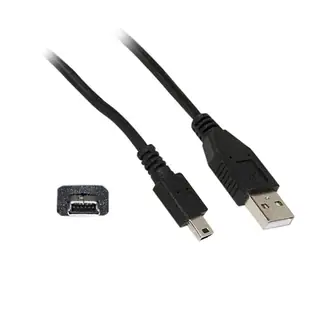
Check under the port cover for a marking, and compare a straight-on photo with the user manual. A five-pin Mini-B plug has a deeper, roughly trapezoidal profile. A Micro-B plug is flatter. Some cameras also use a manufacturer-specific multifunction port that looks almost like USB in a quick photo. The three-foot 10UM-02103BK has a USB-A plug for the computer and a five-pin Mini-B plug for the device. The Micro-B series serves another shape. Inspect the host end as well. A recent laptop may require a compatible data adapter for a USB-A lead.
Why does the camera charge without showing any photos?
Power reaching the camera confirms only part of the connection. A data-capable lead, an appropriate USB mode and working import software must all agree. Consult the camera menu for the transfer mode named in its guide. With a sufficiently charged battery, try the camera’s supplied or known working data cable directly at the computer, then open the import application. If a hub is in the middle, a direct test removes one variable. Record which USB mode worked before disconnecting. Copy a small set first and open the files on the computer before copying an entire event.
What if the camcorder says DV, i.LINK or IEEE 1394?
Look up that connection in the model manual. Both ends of a FireWire 400 cable can differ in size. For example, 10E3-02106 joins a six-pin connection to a four-pin connection, while 10E3-03103 is the four-pin version at both ends. A cable only closes the physical gap between compatible interfaces. Check for a supported FireWire interface and capture application on the computer. Tape capture generally requires playing the recording through the camera. Allow time for a short sound-and-picture test before committing to the whole tape.
Could a card reader save the extra equipment?
If the photos are already on a removable card, identify its format and generation, then compare readers your computer supports. This can be the simplest path when the original camera interface is obsolete. A card reader cannot retrieve material stored only in internal memory or on tape. Once the files arrive, keep the originals on their media until you have verified the copies and made a second copy elsewhere. Label the working cable with the camera model so the next family member can use the same setup.
Compare parts for your setup
Mini USB 2.0 Cable, Black, Type A Male to 5 Pin Mini-B Male, 1 foot
10UM-02101BK
- Connector references
- Type A Male · Mini-B Male
- Configuration
- 5 Pin
- Length
- 1 ft
Compare full-size B, five-pin Mini-B and Micro-B by shape, and confirm the lead supports data transfer. Measure the installed route against this 1 ft length.
Firewire 400 6 Pin cable, IEEE-1394a, 6 foot
10E3-01106
- Configuration
- 6 Pin
- Length
- 6 ft
Compare the 4-, 6- or 9-pin port at each end and verify that the computer supports FireWire capture. Measure the installed route against this 6 ft length.


