
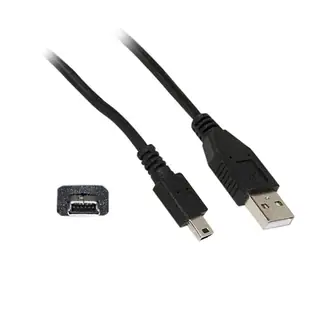
Which cable gets photos off an older digital camera?
The small door beside a camera can hide a charging socket, a USB data port and a video output. Identify the exact camera model before buying. A compact camera using Mini-USB and a tape camcorder using IEEE 1394 need entirely different computer connections.
Read the camera-side connector first
Check the camera manual or compare the keyed socket with the plug photo. The category includes five-pin Mini-B USB cables and FireWire leads; their widths and pin patterns differ. For FireWire capture, verify that the computer has a compatible controller and capture software. A USB socket alone does not establish FireWire support.
What if the camera charges but no files appear?
Use a data-capable USB cable and open the camera’s transfer settings. Depending on the model, it may offer MTP, Mass Storage or another mode. Copy one photo and open the copy before deleting anything. If the camera uses a removable card, a compatible card reader offers another way to retrieve still images.
What information helps with an unmarked camera connector?
Take a straight-on photo of the open port door, then a second shot showing all the adjacent symbols. Note whether the goal is file transfer, tethered shooting or playback on a display. An otherwise compatible lead may solve only one of those tasks, depending on the camera and software.
Transfer an old camera card before buying accessories for a shoot
A used camera may come with a battery and card but no cable. Find its model and open the little port cover before assuming it uses the same cord as your newer camera. Part 10UM-02106BK has USB-A at one end and five-pin Mini-B at the other. Check the manual for the camera's file-transfer method and use a card with one easily recognizable photo to test importing. If the camera supports removable media, a reader compatible with that exact card format is another transfer route. Confirm charging separately because a working USB data connection does not guarantee the camera charges its battery over that port. Keep the successful import method with the camera's model and firmware details.
Do I need a capture cable or a cable for tethered photography?
A product photographer may want every new shot to appear on a computer while the camera stays mounted overhead. That job requires a camera and application that support tethered capture. Seeing photos when the camera is connected as a storage device does not establish remote shutter control or automatic transfer after each exposure. Look up the supported camera model and tethering software first. Then identify the specified data port and the cable route from the stand to the computer. Leave a small loop by the camera so that moving the laptop cannot pull on the socket or alter the framing. Before working with a client, capture several shots, open the transferred files, and check whether the application resumes the session after the camera goes to sleep.
Compare parts for your setup
Mini USB 2.0 Cable, Black, Type A Male to 5 Pin Mini-B Male, 1 foot
10UM-02101BK
- Connector references
- Type A Male · Mini-B Male
- Configuration
- 5 Pin
- Length
- 1 ft
Compare full-size B, five-pin Mini-B and Micro-B by shape, and confirm the lead supports data transfer. Measure the installed route against this 1 ft length.
Firewire 400 6 Pin cable, IEEE-1394a, 6 foot
10E3-01106
- Configuration
- 6 Pin
- Length
- 6 ft
Compare the 4-, 6- or 9-pin port at each end and verify that the computer supports FireWire capture. Measure the installed route against this 6 ft length.


