
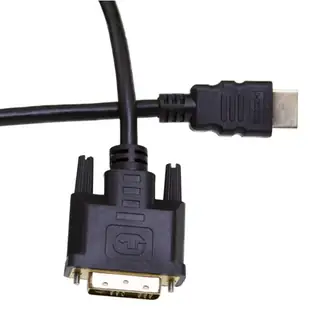
Reuse a DVI monitor with an HDMI source
A DVI monitor can be a useful second screen for a laptop dock or compact desktop with HDMI output. Look for a digital DVI input and check the monitor’s native resolution. Some DVI connectors also carry analog signals, which require a different path.
One cable or an adapter on the monitor?
A cable with HDMI and DVI male ends joins two female device sockets. An HDMI female-to-DVI male adapter keeps a standard HDMI cable in use. Measure space beside the DVI port and allow room for the screws, especially if the monitor’s connectors face downward behind a stand.
Where does the sound go?
Plan audio separately for a monitor with DVI input. Start with a supported desktop resolution and verify the screen shows the operating system. If ordinary desktop video works and protected media does not, check content-protection compatibility on the source and monitor before swapping another cable into the same setup.
What should I write on a shared adapter?
Mark the DVI display model and the video mode you successfully tested. If you obtained sound elsewhere, note that output too. For a meeting room this saves the next presenter from spending setup time looking for volume controls on a monitor with no connected audio input.
Move a DVI workstation to a meeting-room television
A desktop with a digital DVI output can be useful for driving slides on an HDMI-equipped TV. Measure the path from the computer to the selected TV input and check the display mode the workstation can send. A lead such as 10V3-21510 finishes in male plugs for both sockets. If you already have an HDMI cable pulled through the room, compare a suitable HDMI-female-to-DVI plug adapter at the computer instead. Make a plan for sound independently and test it with an actual presentation. A slide appearing on the television establishes the picture path, while a paused video clip tells you nothing about the audio routing. Check the TV's input label if several meeting rooms use the same cart.
Should I use a cable or leave a short adapter on the computer?
A permanently installed HDMI lead in a conference table favors an adapter with an HDMI socket. If a computer moves between rooms, however, a rigid adapter projecting from its DVI port can be bumped while the equipment is being packed. Consider the weight at the port, clearance around the retaining screws and which piece staff can replace most easily. A single mixed-end cable reduces the number of detachable joins when both ends are accessible. A short adapter helps reuse a fixed lead when one end disappears into furniture. Take a picture of the actual loose plug at the table before ordering the mating part. Check which component would take the sideways pressure if someone snagged the exposed lead.
Compare parts for your setup
HDMI to DVI Cable, HDMI Male to DVI Male, 3 foot
10V3-21503
- Connector references
- HDMI · HDMI Male
- Length
- 3 ft
Verify digital DVI support, connector genders and resolution, and plan the audio connection separately if needed. Measure the installed route against this 3 ft length.
DVI-D to HDMI Adapter, DVI Female to/from HDMI Male
30HD-00320
- Connector references
- DVI-D · HDMI · HDMI Male


