
How to keep a DVI monitor working with a newer computer
An older office monitor can make an excellent second screen. Before ordering a DVI cable, turn the monitor around and photograph its input panel. Then photograph the computer or dock that will supply the picture. You are looking for two pieces of information at each end. What shape is the connector, and what kind of video signal does that particular port carry? The answer determines whether a cable can make the connection or whether you need an active converter.
How do I identify DVI-D, DVI-I and DVI-A?
DVI-D carries digital video. DVI-A carries analog video. DVI-I is designed to accommodate digital and analog connections, with actual support determined by the hardware. Examine the flat blade and the area around it, as well as the pattern of contacts in the rectangular section. A photograph straight into the socket is particularly valuable. The four analog contact positions around the blade help distinguish the versions. Never try to force a plug with extra pins into a socket that lacks the corresponding openings. Include both device models when asking for help identifying the connection.
Will an HDMI-to-DVI lead work in my setup?
Suppose a desktop has an HDMI output and a monitor has a DVI-D input. A compatible digital HDMI-to-DVI lead such as the three-foot 10V3-21503 may connect them for picture. Check the resolution and refresh rate supported by the devices and cable. Plan sound separately when using a standard DVI monitor. If the computer instead has USB-C, confirm that the specific port supports display output and look for the stated direction. The 10U2-35003 is described for a USB-C video source feeding a DVI display. Its description tells you which end does which job.
Can a DVI adapter feed a VGA projector?
Start at the source. When a source provides a compatible analog signal, a DVI-A to VGA assembly can carry it to a VGA input. The one-meter 10V4-05301BK is an example of this analog path. A digital-only DVI source feeding an analog-only VGA projector needs conversion. A small plug adapter cannot create the missing signal. If you are booking a project room, have the site tell you which input is accessible from the lectern, how long the installed run is and whether a converter is already present.
What if I only need a little more reach?
An extension has a socket to accept your present cable. An ordinary male-to-male cable joins two device sockets. Check that distinction before comparing lengths. Next, compare single-link and dual-link support throughout the chain, especially when keeping a high-resolution older display. Read the monitor manual for the specific input mode you want to run. After connecting, select DVI in the monitor menu, try a supported setting, and check a known working short cable before adding an extension back into the setup.
Compare parts for your setup
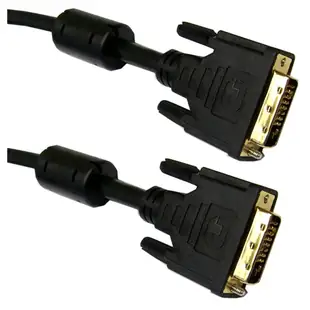
DVI-D Dual Link Cable with Ferrite Bead, Black, DVI-D Male, 1 meter (3.3 foot)
10V2-05301BK-F
- Connector references
- DVI-D · DVI-D Male
- Length
- 1 m (3.3 ft)
Check DVI-D, DVI-I or DVI-A, the pin pattern and the display mode supported by the equipment. Measure the installed route against this 1 m length.
DVI-A to VGA Analog Video Adapter, DVI-A Male to HD15 Female
30DV-05200
- Connector references
- DVI-A · VGA · DVI-A Male · HD15 Female


