
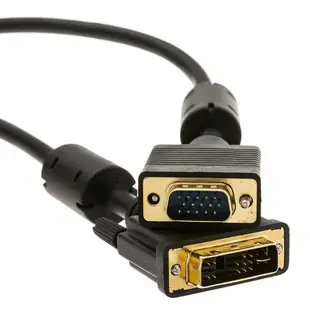
Can a DVI port drive my VGA monitor?
When a classroom projector has only VGA, inspect the DVI output on the computer before buying a cable. The flat blade and nearby contacts help identify the connector. The source documentation tells you whether an analog signal is actually provided there.
When does a passive DVI-to-VGA connection work?
A DVI-A cable routes existing analog video. A compatible DVI-I output can provide that signal when the device supports it. A digital-only DVI-D output needs active digital-to-analog conversion for VGA. The presence of an adapter in this category does not establish which type it is; check the exact models at both ends.
What about Mini-DVI on an older Mac?
Compare the computer’s port photo with Mini-DVI, Mini DisplayPort and full-size DVI before choosing an adapter. For a VGA projector, set the computer to a resolution from its supported list and check the selected input. Carry the projector’s existing VGA cable details if you need to mate with it.
Can extra pins on a DVI plug just be removed?
Choose a connector intended for the actual socket and supported signal. Altering a plug can damage it and does nothing to provide an analog output that the computer lacks. Photograph the DVI face straight on and include the computer model when asking which converter will work.
Connect a VGA calibration monitor to a replacement graphics card
When replacing a workstation graphics card, inspect its DVI output against the manufacturer’s pin diagram. A card that supplied analog video previously may have been replaced with one that provides digital-only DVI. Part 30DV-05200 is a DVI-A male to VGA female analog adapter. It is useful only when the source already provides the required analog signal. If the new output is digital-only, ask for a converter expressly rated for that direction and the monitor mode. Keep the monitor’s existing VGA cable on hand so you can specify the receiving connector correctly. Test the calibration program's working resolution before retiring the original setup. Check whether the reference screen must accept a particular scan rate.
Does a legacy application need a particular video timing?
Some equipment boots with a low-resolution setup screen before switching into its normal operating mode. A converter that shows the final desktop may still leave the operator unable to see an initial menu. If that menu is part of maintenance or training, list both modes when comparing converter specifications. Look up the actual DVI output type and the VGA monitor's accepted input timings. Before final installation, start the system from a full shutdown and watch through the transition. If the picture disappears at one stage, write down which stage and which resolution was requested. That evidence gives a supplier a much better compatibility question than asking whether a converter “works with VGA.” Keep the known working monitor available during the first trial so you can recover the settings.
Compare parts for your setup
DVI-A to VGA Cable (Analog), Black, DVI-A Male to HD15 Male, 3 meter (10 foot)
10V4-05303BK
- Connector references
- DVI-A · VGA · DVI-A Male · HD15 Male
- Length
- 3 m (10 ft)
A digital-only DVI-D source requires active conversion, so check the source signal and the adapter’s direction. Measure the installed route against this 3 m length.
DVI-A to VGA Analog Video Adapter, DVI-A Male to HD15 Female
30DV-05200
- Connector references
- DVI-A · VGA · DVI-A Male · HD15 Female
Mini-DVI to VGA Adapter Cable, Mini-DVI Male to HD15 Female, 6 inch
30H1-55000
- Connector references
- VGA · HD15 Female
- Length
- 6 in
A digital-only DVI-D source requires active conversion, so check the source signal and the adapter’s direction. Measure the installed route against this 6 in length.


