
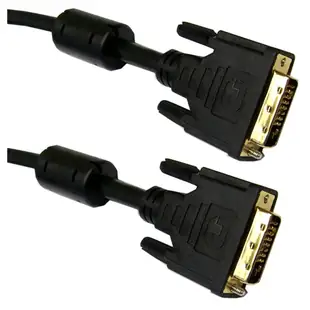
Identify a DVI cable for a monitor you want to keep
An older desktop monitor can still be useful at a workstation if the computer can deliver its native display mode. Read the model on the back and note the connector pattern beside the flat blade. DVI-D, DVI-I and Mini-DVI names refer to different connections.
Is this a direct cable or a display adapter?
The section includes DVI-D cables and extensions as well as USB-C-to-DVI products. An extension accepts the male plug on an existing cable. A USB-C-to-DVI adapter requires a video-capable source port as stated in its listing. Look up the specific computer port before using the shape of the connector to decide.
Will I get my monitor’s intended resolution?
Match the display timing to the supported link on the computer, monitor and any adapter. A dual-link DVI cable cannot supply a higher mode through an adapter that only supports single-link signaling. For a replacement, record the resolution and refresh shown by the original working connection before dismantling it.
How should I measure an extension for a monitor arm?
Place the monitor at the farthest position you actually use and follow the cable channel along the arm. Include the larger DVI connector body in your clearance check. A tight connector can hit the mount behind the screen even when the actual cable is long enough.
Restore a second monitor to its familiar resolution
After a workstation move, the spare DVI cable may produce a picture while the monitor's usual resolution or refresh rate disappears. Check the original cable's digital or analog designation and single-link or dual-link specification against the computer and display manuals. The 10V1-05302BK-F is specifically a two-meter single-link DVI-D cable. Part 10V2-07203BK is a digital dual-link male-to-female extension. That extension needs an appropriate cable already in the path. Try the shortest known-good direct connection at the required mode before adding it. Record the mode the monitor itself reports so a visually similar replacement does not quietly lower the working resolution. Keep the screen's successful mode with the part number in the asset record.
Keeping a known-working display mode after a desk move
Save the currently working resolution and refresh rate along with a photograph of both DVI connectors before disconnecting the workstation. A display used for medical-office paperwork, design review or a specialized machine interface may be set to a mode chosen for legibility in that application. If the old path has a detachable adapter or extension, record that piece too. When you compare a replacement, confirm the complete connection supports the same mode with the actual source. Reconnect the screen and open the application at its usual zoom. A desktop background filling the panel does not prove that small type and fine lines look the way the operator needs. Keep those values with the new workstation's equipment record for the next graphics card change.
Compare parts for your setup
DVI-D Dual Link Cable with Ferrite Bead, Black, DVI-D Male, 1 meter (3.3 foot)
10V2-05301BK-F
- Connector references
- DVI-D · DVI-D Male
- Length
- 1 m (3.3 ft)
Check DVI-D, DVI-I or DVI-A, the pin pattern and the display mode supported by the equipment. Measure the installed route against this 1 m length.
DVI-A to VGA Analog Video Adapter, DVI-A Male to HD15 Female
30DV-05200
- Connector references
- DVI-A · VGA · DVI-A Male · HD15 Female


