
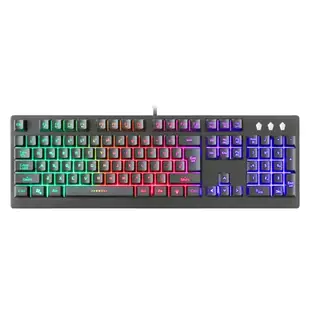
Will this USB gaming keyboard fit my setup?
The keyboard here is a 104-key USB model with RGB lighting. To decide whether it suits your games, check where the cable will reach, whether your computer has the mating USB port and whether the full-size number pad leaves enough space to move your mouse comfortably.
Will the layout feel familiar on a Mac?
Compare the legends on the keyboard with the modifiers and shortcuts you use. Look for operating-system support for any lighting controls or special keys you need. Basic typing and programmable features are separate questions. If you have a USB-C-only laptop, include the required adapter or hub in your desk layout.
How should I test it before a match?
Check the keys in a text editor, then test your actual movement and action combinations in a practice session. Verify any key remaps, microphone shortcuts and mute bindings. If the specification omits simultaneous key limits or switch style, ask about the exact model before relying on that feature competitively.
Which features are worth confirming for a shared workstation?
For a keyboard that alternates between gaming and office use, check the number pad, function-key behavior and lighting controls in the environment where it will stay. If it travels with a laptop, measure the full board and cable against the bag rather than assuming a desktop keyboard will pack easily.
Replace a familiar keyboard at a shared gaming desk
When a shared desktop keyboard fails, write down what people actually used: a numeric keypad, full-size function keys, shortcuts, or lighting that helps in a dark room. The catalog record 5012-80107 identifies a 104-key USB gaming keyboard with RGB lighting and is marked discontinued. Use those details as a comparison point when looking for a current replacement. Check the computer's available port, the keyboard's physical width and the operating system support for any optional remapping or lighting software. A brief test in the actual game can uncover a shortcut conflict that typing a sentence into a text document will miss. Check how the replacement fits with the mouse pad already on the desk.
Will a full-size wired keyboard work through my KVM switch?
If the desk switches between a work computer and a gaming machine, check how the existing KVM handles keyboards. Some units have a designated keyboard socket for switching hotkeys and separate USB ports for ordinary peripherals. The behavior of extra keyboard functions can vary with the port and KVM model. Compare the keyboard connected directly to each computer first, then through the switch. Test ordinary typing, the keys used to change computers and whatever function matters most to you, such as controlling lighting. Check that the device wakes and reconnects after switching back. If the work machine limits accessory software installation, choose around functions that operate in that environment. A successful test on a personal computer cannot establish what an administrator-managed machine will allow.
