
Choosing a gaming keyboard, webcam or microphone stand for a small streaming desk
If the game plays smoothly but your recording looks dim or your voice disappears under the keyboard, replacing the computer is a poor place to start. Separate what the player needs from what the audience receives. On this page the PC and Mac gaming section covers a wired keyboard, and the streaming section includes a webcam and a microphone stand with a phone holder. Each fixes a different problem. A short practice recording can tell you which one is worth putting on the desk.
Will a full-size gaming keyboard fit where I play?
The 5012-80107 is a 104-key USB keyboard with RGB lighting. A full-size layout gives you a numeric keypad, useful when the same computer handles work during the day. It also uses space your mouse may need for sweeping movements in a game. Measure the tray and mark the width of the mouse area before settling on a layout. Check your computer’s available USB port, the operating system support you need, and the keyboard layout you expect in your language. Choose lighting based on whether you can read the keys at your usual playing brightness.
Do I need a webcam, or can I use my phone?
The Sonix 70U2-07510 is listed as a USB webcam with a built-in microphone. Check the host operating system, USB access and the camera modes listed for your software. Test framing with the monitor at its normal angle. A window behind you and a bright monitor in front can produce very different results between afternoon and evening. If you already have a phone you want to use as a camera, work out how its video reaches the computer. A holder provides the position. Compatible capture software or another supported video path is still required to send the picture.
What does a microphone stand actually add?
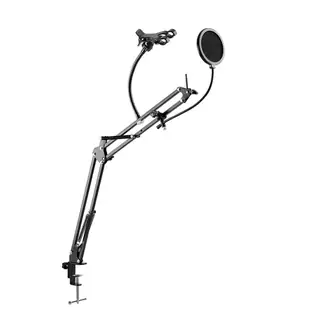
The 8190-00026 combines a desktop microphone stand, rotating phone holder and pop filter. Check the microphone mounting arrangement and what is included before ordering. A stand helps keep the mic a repeatable distance from your mouth, especially when you turn toward a second monitor. Inspect where it sits relative to the keyboard and fan exhaust. A pop filter placed in front of a compatible mic can soften bursts of air on words beginning with P or B. It will have little effect on a noisy fan across the room.
How can I tell whether the change helped?
Make a thirty-second local recording with normal gameplay sound, your speaking voice and a few keystrokes. Listen on headphones after the recording finishes. In OBS, check which source meter moves when you speak and which responds to the game. Disable a duplicate microphone capture if the same voice is being added twice. Change one thing, record the same passage, and compare. Save the working device names and settings. It is much easier to restore a good setup after moving a USB plug when you know which input produced the original recording.


