
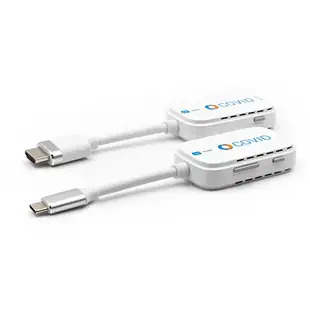
Choose a wired or wireless HDMI extender for a room
A presenter may need to reach a wall display from a table with no nearby HDMI socket. Draw where the laptop, display and power outlets sit. The listed extenders include wireless USB-C transmitter sets and an HDMI-over-category-cable kit with loop-out and infrared support.
Can the extender use the cable in the wall?
Read the installation guide for the exact transmitter and receiver. A kit that uses an RJ45 connector and Cat5e or Cat6 may require a dedicated point-to-point cable. Plugging its transmitter into a normal office network switch is appropriate only if the kit explicitly supports that network design. Check distance and resolution together.
What changes for a wireless presentation?
Confirm the laptop supports the transmitter’s required USB-C video mode. Consider walls, furniture and the presenter’s position before relying on an advertised range. Test the actual slide deck, sound and moving video from the seats where people will present. A static welcome screen is an easy first test but says little about motion or delay.
Is a local output useful at the source?
A loop-out can let the presenter see a copy at the desk while the remote receiver drives the main screen. Check that the particular transmitter lists this connection. When the display modes differ, test the desk monitor and projector together with the same material before installation day.
Check what comes in the box for a rolling presentation cart
A wireless transmitter on a lectern and a receiver behind the screen are two different pieces. Atlas 41U3-40001 is explicitly listed as a transmitter only. If the room has no matching receiver, compare a complete pair and its supported source, resolution and distance instead. For a wired model such as 41V3-28300, identify how the transmitter and receiver are meant to connect and what power each end needs. A connector that accepts a network cable does not establish permission to route that signal through an office Ethernet switch. Test a presentation with the cart in its usual position and include the receiver's power supply on the inventory list. Confirm who has the paired receiver before borrowing only the transmitter.
Can someone change the channel from the far room?
Picture and sound may reach the far screen while the source's remote control stays out of range. If a lobby TV must show a different channel for an event, decide who will operate the source and from where. Some extender listings mention IR support. Check the exact kit for an IR receiver, emitter and supported direction, then compare that arrangement with how the source accepts commands. A Bluetooth or radio-frequency remote introduces a different requirement from infrared. If staff can operate everything in the equipment closet, the return-control feature may add little. Testing a channel change from the viewer's seat reveals a practical gap that a sharp picture can hide. Ask whether the owner needs to control the remote display itself as well as the nearby player.
Compare parts for your setup
Wireless USB C to HDMI Extender Set, 1080p@60Hz, Pair, 30 Meter Range(100ft)
41U3-41000
- Connector references
- USB C · HDMI
- Video format
- 1080p@60Hz
- Dimensions in listing
- 30 Meter · 100ft
Wireless USB C to HDMI Extender, 4K@60Hz, Tx Unit Only
41U3-40001
- Connector references
- USB C · HDMI
- Video format
- 4K@60Hz
HDMI Extender 50 meters over Cat5e/6 with loop out and IR, Supports up to 4K60
41V3-28300
- Connector references
- HDMI
- Ethernet category
- Cat5e
- Dimensions in listing
- 50 meters


