
Choosing an HDMI cable, switch, splitter or extender for the picture you want
One TV, three sources and a sound system create a very different shopping list from a single laptop feeding two classroom screens. Write the video path in plain language before looking at connector sizes. For example, “the console and the streaming box both go to one TV” points toward a switch. “One player shows the same menu on two screens” points toward a splitter. The next questions are how far the signal must travel and what picture mode you expect at the far end.
What does “4K HDMI cable” tell me?
Resolution is only the beginning. A computer desktop at 4K and 60 Hz, film playback at 24 Hz and gaming at 120 Hz place different demands on a link. High dynamic range, color format and supported features can matter as well. Check the output on the source and the specification for the exact HDMI input on the screen. Look for a cable rated for the required mode and, when applicable, verify its official certification label. A cable upgrade can remove a bottleneck. It cannot unlock a display mode the screen or source does not support.
Which way should the HDMI connections run?
Match the socket size at both ends. Full-size HDMI Type A is common on televisions. Some cameras use Mini HDMI, and their manuals identify the actual port. A USB-C to HDMI cable such as 10U2-34003 is described for a device supplying video over USB-C to a television with an HDMI input. Check whether the USB-C port provides display output. When planning a long active optical HDMI run, identify the source and display ends on the actual cable. Test it with the intended equipment and settings before it disappears inside furniture or a permanent pathway.
Will a switch or splitter keep the same picture quality?
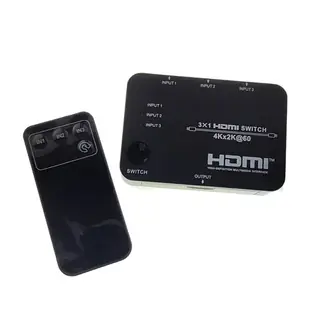
Part 41V3-21030 is listed as a three-input, one-output switch. Part 41V3-03020 sends one source to two displays. Either adds another component whose supported formats must suit the system. With a splitter, identify what both displays can show and check how the unit handles their different reported capabilities. Two screens showing the same image is a useful menu-board setup. Someone who wants a separate desktop on each monitor needs a computer and display arrangement that supports independent outputs. A simple duplicate-image splitter does not create that second workspace.
Do I need a complete HDMI extender kit?
For a longer route, record which devices are at each end and whether both locations have power available. The wireless extender listing 41U3-40001 is a transmitter-only unit. The 41U3-41000 is listed as a transmitter and receiver pair with its own stated video mode. Compare the whole package rather than assuming every extender includes a matching receiver. Test a direct short cable first, add one component at a time, and note the result at the actual resolution. This makes a blank screen much easier to isolate after the system is installed.
Compare parts for your setup
2.0 HDMI Switch, 3 way, 3x1, HDMI High Speed with Ethernet, 4K@60Hz, HDCP2.2, USB powered.
41V3-21030
- Connector references
- HDMI
- Video format
- 4K@60Hz
4K UHD HDMI Active Optical Cable(AOC), in-wall(CL3), HDMI Male, 100 Foot
12V4-430HD
- Connector references
- HDMI · HDMI Male
- Configuration
- Active Optical
- Video format
- 4K
- Jacket rating
- CL3
Check the source and display ends before routing, along with supported resolution, refresh rate and jacket rating. Measure the installed route against this 100 ft length.
Comzon 10K/8K/4K 48Gbps Ultra-High-Speed Certified HDMI Cable, 4K120 / 8K60 / 10K, HDMI-A Male, Silver & Black woven jacket, 1 meter
C2001
- Connector references
- HDMI · HDMI-A Male
- Data rate
- 48Gbps
- Video format
- 10K · 8K · 4K
- Length
- 1 m
Check connector size and the stated capability at the exact length you need. Measure the installed route against this 1 m length.


