
Choose HDMI cable by the picture mode you actually use
A spare cable may handle a streaming box at one picture mode and fail when a game console switches to a higher refresh rate. Read the output setting you want and the matching capability of the specific TV input. Then compare certified cable categories and the available lengths.
Which connector size belongs on my device?
A full-size HDMI-A plug on a TV does not identify the connector on the camera at the other end. This section includes Micro HDMI Type D leads and panel-mount extensions among standard cables. Check the small device’s manual, compare the connector photo and decide whether you need a complete cable or an extension.
How can I verify a higher-performance cable?
Where certification is advertised, check for the official certification label and its verification method. Test the final arrangement with your actual settings, including refresh rate and HDR where relevant. If a switch or receiver is normally in the path, try a direct connection first, then add that device back to isolate its limitations.
Should I replace every cable on the way to the TV?
Change one segment at a time. A system routed through a receiver has at least two independent cables: one from source to receiver and one from receiver to TV. Label the segment you replace and keep the same input, picture mode and test program when comparing results.
Replace a camera’s monitor lead without losing strain relief
Some cameras send HDMI through a smaller connector under a side door. Identify whether yours is Mini HDMI, Micro HDMI or full-size HDMI from the camera documentation and inspect the monitor end separately. The 10V3-43115 is a fifteen-foot lead with Mini HDMI Type C at one end and full-size HDMI at the other. Check whether your camera cage or cable clamp leaves room for its molded plug. Set the camera to the output mode you plan to monitor, then move it through the filming positions with the lead supported. If you also need to transfer recorded files, identify that workflow separately from the live HDMI preview. Label the camera end so rental staff can return it to the correct kit.
Which cable should I replace in a console and soundbar setup?
A game console feeding a soundbar that then feeds a television uses two independent HDMI runs. Read the supported mode of each relevant port before ordering a premium cable twice. Try the console directly at the television with the cable already known to support the target picture mode. Reintroduce the soundbar and second lead after recording that result. If the mode changes, compare the soundbar's documented passthrough and the capability of that second run. If you instead route picture straight to the television and return audio to the soundbar, check ARC or eARC support on the chosen sockets. The two wiring plans can call for different features. Include both TV inputs in the wiring sketch if the soundbar and console use separate paths.
Compare parts for your setup
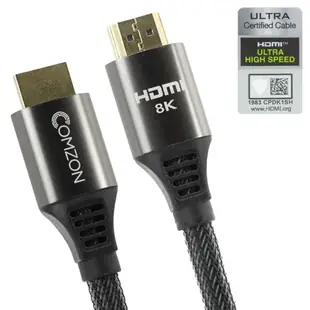
Comzon 10K/8K/4K 48Gbps Ultra-High-Speed Certified HDMI Cable, 4K120 / 8K60 / 10K, HDMI-A Male, Silver & Black woven jacket, 1 meter
C2001
- Connector references
- HDMI · HDMI-A Male
- Data rate
- 48Gbps
- Video format
- 10K · 8K · 4K
- Length
- 1 m
Check connector size and the stated capability at the exact length you need. Measure the installed route against this 1 m length.
HDMI Extension Cable, High Speed with Ethernet, HDMI-A male to Panel Mount HDMI-A female , 4K @ 30Hz, 1 foot
10V3-12201
- Connector references
- HDMI · HDMI-A male · HDMI-A female
- Video format
- 4K @ 30Hz
- Mounting
- Panel Mount
- Length
- 1 ft
Ultra-Slim Active HDMI Cable, High-Speed with Ethernet , RedMere chipset, 4K@30Hz, 36AWG, black, 3 foot
10V3-48103
- Connector references
- HDMI
- Video format
- 4K@30Hz
- Wire gauge
- 36AWG
- Length
- 3 ft
Check connector size and the stated capability at the exact length you need. Measure the installed route against this 3 ft length.


