
Connect an HDMI player to a DVI-equipped display
A spare DVI monitor can show a video feed from an HDMI-equipped computer or another compatible source. Start with the DVI input type and supported picture modes. A digital display with a DVI-D input is a different destination from a VGA-only screen with an old adapter attached.
Choose the part around the cable already installed
If you have an HDMI cable routed through a desk, an adapter with an HDMI female end can preserve that run. If both devices sit nearby with empty sockets, a male HDMI-to-male DVI cable reduces the number of joints. Check the DVI connector body against the space left beside the display stand.
What should I check for a presentation?
Match the computer’s output to a resolution and refresh rate listed by the monitor. Arrange separate sound for a DVI display that lacks a compatible audio path. Test the presentation with its actual clips or protected material before taking the equipment to a venue. A static slide does not test every part of playback.
How should I pack a connection kit?
Take the video cable, any separate audio lead and the stand or monitor model information together. If you expect someone else to set it up, label the signal source and the display input. That is more useful in a venue than a bag of loose connectors that all appear plausible.
Use a retired DVI monitor as a digital signage screen
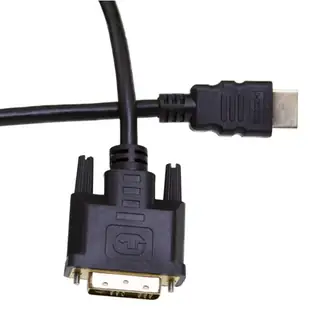
A spare office monitor can display a menu board from a player with HDMI output. Check the monitor's digital DVI input and the modes it supports before choosing the cable. A three-foot 10V3-21503 may fit where the player mounts directly behind the display. Leave enough clearance for the screws and power connector, then test the player's startup screen and the actual menu after a power cycle. If the screen has speakers, check separately how it receives sound. For a silent menu, disable unnecessary audio in the signage setup. Where the display must play promotional video with sound, budget the appropriate audio path too. Test text from the normal customer viewing distance before final mounting.
Can the monitor wake up unattended every morning?
A DVI screen reused with an HDMI signage player might work perfectly during installation and still sit dark after an overnight shutdown. Check whether the monitor remembers its selected input and whether the player supplies a compatible timing immediately after restart. Set the screen to its normal input, restart the actual player and watch an entire boot cycle before leaving it on the wall. For a part that screws into the DVI socket, also confirm there is room for the joining hardware behind the bracket. If staff must unplug a lead to regain picture each day, record the power sequence and monitor settings before ordering a different cable. Try the exact order the building uses when restoring power after a weekend closure.
Compare parts for your setup
HDMI to DVI Cable, HDMI Male to DVI Male, 3 foot
10V3-21503
- Connector references
- HDMI · HDMI Male
- Length
- 3 ft
Verify digital DVI support, connector genders and resolution, and plan the audio connection separately if needed. Measure the installed route against this 3 ft length.
DVI-D to HDMI Adapter, DVI Female to/from HDMI Male
30HD-00320
- Connector references
- DVI-D · HDMI · HDMI Male


