
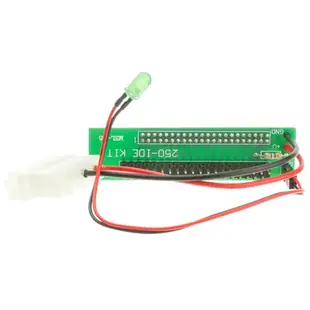
Read a notebook PATA drive on older desktop equipment
The 44-pin connector on a notebook IDE drive looks much smaller than the ribbon connector on a desktop. The adapter here joins the two physical formats for an existing PATA setup. Check the interface marked on the drive before judging it by the drive’s dimensions.
What does the computer provide?
Look for an actual desktop 40-pin IDE interface and check the adapter’s power provision against the instructions. A modern computer with only USB or SATA connections needs a compatible interface for the older drive. Record the drive model so you can identify its power requirements and any jumper settings from its manual.
What if the files matter?
If an old disk holds the only copy of a project, decide where a copy will go before starting. If the system suggests initializing or formatting the drive, pause and verify that it can read the existing file system before authorizing any changes.
Check the drive while it is out of the notebook
A drive taken out of its original carrier may still have a small manufacturer-specific interposer covering the drive pins. Look up the notebook’s drive removal diagram and compare what you see with the label on the bare drive. If the contacts on the carrier look different from the drive connector in the diagram, identify the parts before ordering an adapter for the wrong surface. Save the caddy, screws and any original interposer together. They can be important if the transfer succeeds and the drive needs to return to the notebook exactly as it was installed.
The laptop is gone, but the backup drive is still here
An unlabeled enclosure can hide the important detail. Read the identification printed on the bare drive or on the original computer's service sheet. The 3250-03500 is for a 44-pin notebook PATA drive and a desktop 40-pin PATA connection. The drawing should also explain how the installation supplies power. Check that the recipient computer actually has a compatible IDE controller. If the only available machine is a recent USB laptop, write that on your parts request. A desktop pin adapter by itself cannot provide the USB host interface for that recovery job.
Does the original notebook still read the disk?
A notebook with a damaged screen or keyboard can still be a useful reference for identifying its drive, especially when you have only one disk and are unsure whether its age or the adapter caused a failure. If the machine is available and its manufacturer-approved setup can still display the drive information, record the model and capacity it reports before moving the drive. Photograph any jumper arrangement rather than changing it simply because a desktop manual mentions master or slave settings. Consult the individual drive instructions and host arrangement for the required configuration. Keep that original state available for a meaningful comparison if the desktop does not recognize the drive.
A closer look at this part
IDE NoteBook Hard Drive to Computer Hard Drive Adapter, 2.5 inch IDE/PATA (44 Pin) NoteBook to 3.5 inch IDE/PATA (40 Pin)
3250-03500
- Configuration
- 44 Pin · 40 Pin
- Dimensions in listing
- 2.5 inch · 3.5 inch
