
Find the right drive cable for a legacy workstation or storage enclosure
A drive pulled from an old workstation may still contain the only copy of a project. Before shopping for an IDE adapter, SCSI terminator or SAS cable, photograph the drive label and the controller or enclosure it came from. Include the full connector face and the area around it. A short description like “old hard drive with lots of pins” can point to several entirely different storage interfaces.
Is the drive PATA, SATA, parallel SCSI or SAS?
Look up the manufacturer's specification by model number. PATA is the parallel ATA interface also called IDE. A desktop PATA ribbon connection and a compact notebook PATA connector can require different pin counts and power arrangements. Atlas part 3250-03500 is specifically for the 44-pin notebook to 40-pin desktop IDE combination. An internal SATA data lead such as 21SA-0005M belongs to a different interface. When bringing an older disk to a modern computer, list the drive's data connection, its power requirement and the host interface separately. A plug adapter can solve the mechanical mismatch while leaving you without a suitable controller or power source.
Which SCSI connector is on each end?
A single external SCSI chain can include several connector shapes. Look at the contact arrangement, latch or screw posts, plug gender and available clearance. HPDB68 and VHDCI68 have the same contact count but a different face. Catalog part 10N3-01106 joins a VHDCI68 male end to an HPDB68 male end. Its offset orientation matters where adjacent ports or a shelf sit close to the connector. For a drive inside an enclosure, check whether the controller expects an internal ribbon connector. Write the controller end first and the drive or enclosure end second so the two parts of your search stay clear.
Why does the last device in a parallel SCSI chain matter?
Before changing the chain, mark which unit is at each end and photograph any external terminator or termination-setting labels. Parallel SCSI needs the termination arrangement specified for the bus. A label such as active, passive or LVD is significant. The CN50 passive terminator 30C2-05500 is a particular component for a particular setup. A physically similar connector does not establish that it is the right choice for another controller. Use the manuals for the controller and drives to check termination and device IDs, especially if you have removed the unit that formerly ended the chain.
What changes when the enclosure says Mini-SAS?
Read the actual connector designation on both enclosure and controller. The external 23SA-02001 lists SFF-8644 at both ends. Other Mini-SAS assemblies have different plugs or break out to separate destinations. Check the vendor's approved cable arrangement and measure along the rack path with enough room to release each latch. If preserving an irreplaceable disk is the goal, identify the connection before powering it and avoid initialization or formatting prompts. Record the working combination of controller, cable, power and enclosure alongside the disk so the next retrieval starts with a known setup.
Compare parts for your setup
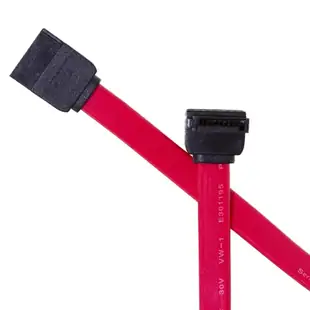
Serial ATA (SATA) Cable, Single Right Angle Connector, Internal, 0.5 meter (1.5 foot)
21SA-5005M
- Connector references
- SATA
- Configuration
- Internal
- Length
- 0.5 m (1.5 ft)
Distinguish the 7-pin data connector from 15-pin power and check plug orientation and available space. Measure the installed route against this 0.5 m length.
SCSI Terminator, Centronics 50 (CN50) Male, One End, Passive
30C2-05500
- Connector references
- Centronics 50
- Configuration
- Passive
IDE NoteBook Hard Drive to Computer Hard Drive Adapter, 2.5 inch IDE/PATA (44 Pin) NoteBook to 3.5 inch IDE/PATA (40 Pin)
3250-03500
- Configuration
- 44 Pin · 40 Pin
- Dimensions in listing
- 2.5 inch · 3.5 inch


