
Match a SCSI ribbon, internal drive or slot bracket
Inside an old workstation, a ribbon cable can end a few inches from a drive with a different connector. Start by identifying the connector on the ribbon and the one on the drive or controller. Write down which side exposes pins.
Compare 50-pin and 68-pin layouts
The internal options here include 50-pin IDC and half-pitch 68-pin D-sub connections in different genders. A part with two male ends cannot replace one with sockets on both sides. Compare locating keys and cable exit direction, especially near the side panel or drive tray.
Moving a connection outside the case
A slot bracket can present an external connector on the back panel. Confirm the external cable and device fit that port, then review the controller’s permitted bus arrangement and termination. An adapter can change the attachment point while those electrical requirements still apply to the whole chain.
Will the adapter leave the next drive accessible?
Inside a tightly packed chassis, the width of a bare adapter board can matter more than the length of the ribbon cable. Look along the drive cage and identify the tabs, rear connectors and ventilation openings the board might cover. Make a sketch with the drive in its intended bay and the cable approaching from its real direction. If the bracket or adapter would have to sit at an angle for the ribbon to reach, measure another route and check the manual before committing. A properly aligned connector also makes it much easier to service the next drive later.
Finding room for an adapter inside a loaded chassis
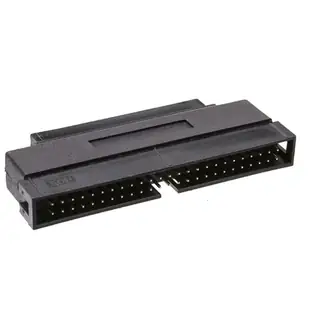
The connector itself can fit while the installed drive tray no longer closes. The 30P2-28100 lists an internal half-pitch DB68 male end and an IDC 50 male end. Sketch which connector on the cable or device receives each plug. Check the available clearance with adjacent bays occupied and allow the ribbon to follow its intended route. Also review the controller manual for the supported bus configuration and termination when attaching a narrow device. Keep the existing chain diagram beside your sketch so the new physical arrangement and the required electrical arrangement are both accounted for.
Do you need a second channel or another connector?
A project can start with an empty chassis opening and a plan to add a second external SCSI device. Before ordering a slot adapter, identify whether the existing controller already has the appropriate bus connection and whether the planned devices can share that bus. Some designs need a separate controller channel to keep different requirements apart. A bracket can bring an existing connection to the back panel, but it cannot create an independent controller channel. Check the host card’s documentation and diagram the existing internal and external devices together. This helps avoid spending money on a physical connection that leaves the original architectural problem unresolved.
Compare parts for your setup
Internal SCSI Adapter, HPDB68 (Half Pitch DB68) Male to IDC 50 Male
30P2-28100
- Connector references
- HPDB68 · DB68 · IDC 50 Male
- Configuration
- Internal
SCSI Computer Slot Adapter, Internal IDC 50 Male to External HPDB50 (Half Pitch DB50) Female
31P1-10300
- Connector references
- IDC 50 Male · HPDB50 · DB50
- Configuration
- Internal · External
SCSI Computer Slot Adapter, Internal IDC 50 Male to External HPDB68 (Half Pitch DB68) Female
31P2-32300
- Connector references
- IDC 50 Male · HPDB68 · DB68
- Configuration
- Internal · External


