
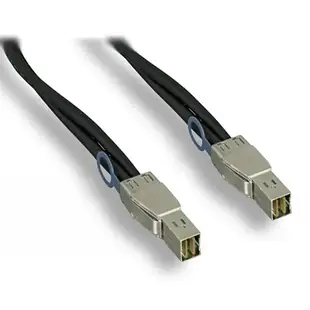
Which external Mini-SAS cable links the controller and shelf?
A storage shelf fits neatly in the rack, but the connector on its external SAS port may be a different generation from the controller. Look up the connector designation on both pieces of hardware before buying by the word “Mini-SAS.”
Compare the SFF numbers
The choices here include SFF-8644 at both ends and SFF-8644 to SFF-8088. Read the shelf manual for which external port is the host input, and follow the controller documentation for supported shelves and speeds. A physically mixed-end cable does not establish support for every combination of controller and enclosure.
Plan access at the back of the rack
Measure the path with the cabinet door closed, allowing access to the connector latch and space for equipment on slides. Label each end with the controller port and shelf port. That saves time if you later move one shelf while a second stays in service.
Tell a cable fault from an enclosure configuration change
If the controller stops discovering an entire shelf after a rack move, record which ports the cable occupied before moving it to another one. Compare any link indicators and the controller’s own enclosure view with your previous working arrangement. If a single drive disappears but the rest of the shelf remains accessible, also check the drive slot and enclosure status in the documented management interface. Those two symptoms can point to different repair paths. Keep a spare with both SFF connector numbers on its label so the next swap tests a known equivalent assembly.
Moving the storage shelf one rack position
Copy the SFF designation from both the controller and the shelf before measuring the new run. If one end is SFF-8644 and the other SFF-8088, the two-meter 23SA-02102 illustrates that particular external pairing. The one-meter 23SA-02001 instead puts SFF-8644 at each end. The same shelf can have more than one socket, so check which port its diagram designates for the host path. Label the old route by its two endpoints and allow room to release both latches at the new rack position without disturbing the shelf next to it.
Ordering a replacement between two generations of storage
A parts request that names only the newest shelf can send purchasing toward a cable with that newer connector at both ends. Include the controller or host bus adapter model and the enclosure model on the same request. If there is an expansion unit between them, identify the two pieces of equipment that are physically adjacent at the failed span. Take a picture of the markings on the old cable if they remain legible. Comparing that span independently avoids ordering a host-to-enclosure assembly when the actual missing cable joins two shelves in a supported chain. Ask the storage vendor about qualified lengths for that precise link.
Compare parts for your setup
SFF8644 External Mini-SAS Cable, 12Gbit, SFF8644 male to SFF8644 male, 1m
23SA-02001
- Configuration
- External
- Data rate
- 12Gbit
SFF8087 Internal to SFF8088 External Mini-SAS Cable, 6Gbit, SFF8087 male to SFF8088 male, 2m
23SA-02301
- Configuration
- Internal · External
- Data rate
- 6Gbit
SFF8088 External Mini-SAS Cable, 6Gbit, SFF8088 male to SFF8088 male, 1m
23SA-02201
- Configuration
- External
- Data rate
- 6Gbit


