
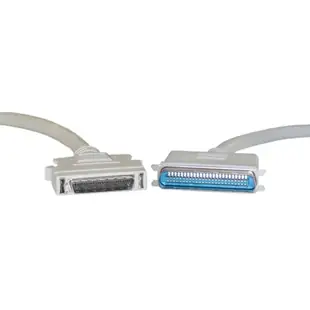
Identify a 50-pin SCSI cable by both connector styles
When an older scanner moves to another workstation, “50-pin SCSI cable” can describe more than one useful part. Some devices use the small half-pitch connector with rows of contacts. Others use the wider Centronics style with a different fastening system.
Which connection is on the scanner?
Photograph both ports straight on with the existing cable disconnected according to the device manual. Compare each view with the listing for HPDB50 or CN50. Follow the direction of the connector’s fasteners and give the cable room to bend gently behind the unit.
How far will the entire chain run?
For a scanner between several SCSI devices, measure all cable sections and check the controller’s supported bus length and termination. An individual lead that reaches across the desk still becomes part of a longer bus. If the scanner worked before a move, retain those original lengths and device positions as a reference.
Which device is actually missing from the chain?
A useful troubleshooting note lists the devices the controller still detects in their physical order. If a scanner and everything beyond it disappear after a cable change, inspect the two connections around that section and what happened to the end termination. If only one device is missing while later units appear, also review that device’s ID, local power and own settings. Follow the equipment documentation before disconnecting or moving anything. Recording these observations before swapping the whole cable set gives a technician something specific to compare with the previously working layout.
Replacing a scanner cable with a missing label
Look at both ends of the working installation before removing the old cable. One common arrangement uses a smaller half-pitch connector at the host and a wider Centronics-style connector at the scanner. The 10P1-01106 is a six-foot example with HPDB50 male and CN50 male ends. A photograph of just the controller would also suggest several wrong candidates. Document the scanner end, which sockets remain occupied and where the chain is terminated. If the scanner worked previously, change only that cable for the first test and use the same host configuration and scanning software.
Reusing a flatbed scanner in a new work area
A scanner may have to sit on a pull-out shelf so its lid can open fully under a countertop. Look at the cable connection with the shelf pushed in and extended, and measure the route the manufacturer permits in both positions. If the scanner should be disconnected before a move, make the connector accessible without twisting the cable. Where both scanner ports fit the proposed lead, check the installation instructions for how the unused end and any continuation of the chain should be handled. Keep the power supply and any external terminator with the scanner when moving it between work areas.
Compare parts for your setup
SCSI II cable, HPDB50 (Half Pitch DB50) Male to Centronics 50 (CN50) Male, 25 Twisted Pairs, 6 foot
10P1-01106
- Connector references
- HPDB50 · DB50 · Centronics 50
- Length
- 6 ft
Compare HPDB50 and Centronics-style ends carefully and verify termination across the assembled bus. Measure the installed route against this 6 ft length.
SCSI II cable, HPDB50 (Half Pitch DB50) Male, 25 Twisted Pairs, 6 foot
10P1-02106
- Connector references
- HPDB50 · DB50
- Length
- 6 ft

