
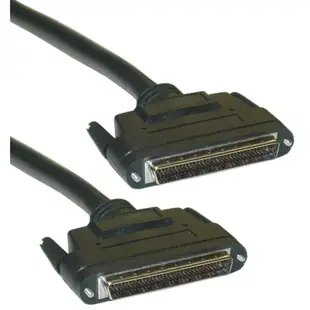
Replacing a 68-pin SCSI LVD cable
A three-foot 68-pin LVD cable can be a practical replacement in a storage setup when both the electrical interface and connectors match. Copy the controller and enclosure model numbers while you still have them in front of you.
Which 68-pin plug?
Look for the half-pitch DB68 designation in the listing and compare the fastening arrangement with the actual port. A very-high-density 68-pin connector takes up less space and belongs to a different connector family. Counting contacts gives only part of the answer here.
Preserve the working bus configuration
Record which devices are at the two ends of the bus and how the existing setup handles termination. If you also change the enclosure or controller, review its approved LVD configuration in the manual. Keep a usable original cable for a direct comparison if a device disappears after the change.
What information should accompany a spare?
A storage rack that stays in service for years can outlast the person who originally assembled it. Store the replacement cable with the model of the adapter card, the enclosure it serves and the electrical mode in the manual. Note which device was last in the chain the day the replacement was tested. If an apparently similar shelf later moves onto the bus, the service record will show whether its requirements were ever part of that original test. This is especially useful when several SCSI leads in the same cabinet have the same number of contacts.
What to record before moving an LVD storage array
A drawing of host, devices and terminators is worth keeping with the cable order. Record the whole bus span, where the proposed replacement sits, and the controller's supported configuration. The 10P2-39103 is identified as a three-foot external LVD cable with HPDB68 male connectors. LVD is part of the electrical description, while HPDB68 describes the physical connection. Verify both against the installed system. A cable that is longer than the old one changes the total bus length even if it looks identical at each face. Check that total against the controller and device manuals.
Check a replacement against the expected workload
A controller listing a drive at startup is an important first observation, but a real workstation may rely on sustained reads from that drive. Follow the storage system’s normal verification procedure, using a safe, existing test or read operation approved for the data in use. Record whether the controller continues to see the device and whether its logs report a change in transport behavior. If the problem occurs only with the replacement, compare its connector specification, cable length and documented electrical mode against the original. Do this before changing the drive contents or blaming the application for a link that behaves differently under load.
A closer look at this part
SCSI III LVD cable, Black, HPDB68 (Half Pitch DB68) Male, 34 Twisted Pairs, 3 foot
10P2-39103
- Connector references
- HPDB68 · DB68
- Length
- 3 ft
Verify that both endpoints support the stated signaling mode, pin count and connector shell. Measure the installed route against this 3 ft length.
