
Is your SATA drive missing the data cable or the power lead?
A desktop drive can sit in the right bay with two different connections still to make. Look at the shorter, seven-pin SATA data connector and the wider, fifteen-pin SATA power connector. Follow each back to its destination before selecting a replacement.
Straight or right-angle ends?
Check how much space remains between the drive and the side panel. A right-angle fitting can help in a shallow tray, but its exit direction matters when another drive sits directly below it. Measure the path to the motherboard for data and the device-side power harness for power.
Reusing an existing drive
If the drive does not appear after a move, check its model and whether the controller sees it before changing operating system settings. A power adapter supplies one part of the connection. It cannot provide a SATA data port on a computer that lacks one.
Check what the removable caddy already provides
A desktop with individual SATA cables and a chassis with a drive backplane can use the same disk in two different ways. In the first case the data and power leads connect directly to the disk. In the second the disk may slide into a carrier that mates with a fixed connector. If you are replacing a failed drive in the latter arrangement, consult the caddy instructions before ordering leads for the back of the disk. If you are connecting the disk outside the carrier for a transfer, work from the connections on the bare drive and the host you will use for that transfer.
Will the side panel clear a tall drive connector?
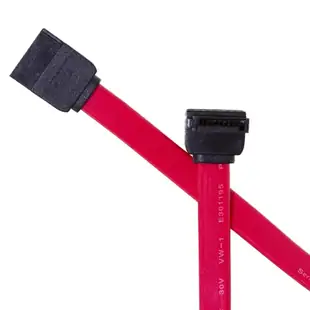
With the computer disconnected and opened per its service manual, compare the drive's two adjacent sockets and the free clearance beyond them. The 21SA-5005M is a half-meter internal data lead with one right-angle connector. Depending on how the drive faces, the bend may route the cable toward a neighboring power plug or away from it. Compare the product photo with a photo of your drive bay taken from the same angle. A normal straight cable such as 21SA-0005M may route more cleanly when the tray already has a channel behind the drive.
Will the replacement fit past neighboring motherboard ports?
On a motherboard with tightly stacked SATA sockets, a tall latch or angled connector body can make the next port hard to use. Examine the board from the angle at which the installed cable will approach, especially if a graphics card or fan shroud sits over the connectors. Decide which end needs the low-profile or angled shape and which can remain straight. For a system with several drives, match the board’s port labels to the drive bays before moving any leads. Keeping that location map makes diagnostics and replacements easier when the operating system identifies several disks of the same model.
Compare parts for your setup
Serial ATA (SATA) Cable, Single Right Angle Connector, Internal, 0.5 meter (1.5 foot)
21SA-5005M
- Connector references
- SATA
- Configuration
- Internal
- Length
- 0.5 m (1.5 ft)
Distinguish the 7-pin data connector from 15-pin power and check plug orientation and available space. Measure the installed route against this 0.5 m length.
LP4 5.25 Male to SATA 15-Pin Female x 2 Internal Computer Power Adapter Y Cable, 6in
31SA-006P
- Connector references
- LP4 · SATA 15-Pin Female
- Configuration
- 15-Pin · Internal
- Length
- 6 in
Identify the function, connector keying, available clearance and, for power splitters, the supply’s load limit. Measure the installed route against this 6 in length.
Serial ATA (SATA) Cable, Internal, 1 meter (3.3 foot)
21SA-001M
- Connector references
- SATA
- Configuration
- Internal
- Length
- 1 m (3.3 ft)
Distinguish the 7-pin data connector from 15-pin power and check plug orientation and available space. Measure the installed route against this 1 m length.


