
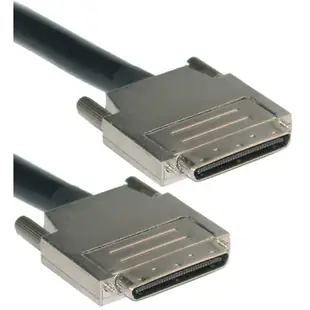
Match a compact VHDCI 68 cable to a controller
A controller with several ports on one bracket often has very little space for each connector. A photograph beside a ruler helps distinguish a compact VHDCI plug from the larger half-pitch 68-pin connector used by some external SCSI devices.
What is at the enclosure end?
The catalog includes VHDCI options with different far ends, including a lead to HPDB68. Check the port drawings, male or female ends and offset orientation. On a dense bracket, the wrong cable exit can block the latch or screw on the adjacent port.
Keep the routing diagram
Before disconnecting a multi-shelf setup, label each port and photograph the way the existing lead passes the rack rails. Compare the replacement length with that route and confirm the controller’s limits for the complete SCSI bus. A short straight-line measurement can miss the trip around the side of the cabinet.
Check the service loop on a sliding shelf
A storage shelf pushed fully into a rack can hide a problem that appears the first time a technician pulls the shelf out for service. Check the documented movement allowed for connected cables and measure the distance at the permitted service position as well as at rest. If the assembly must be disconnected before moving the shelf, label both matching ends where the technician can read them. A slim, offset VHDCI plug is easy to confuse with the identical plug resting one row below it. Include the controller port number in the label to settle that question before reconnecting.
Two controller ports fit side by side. Will both cables?
An isolated port can be easy to reach even when the second one on the same card is cramped. The 10N3-14106 is an offset VHDCI 68 cable. Look at how the retaining screws, shell and cable exit line up with the second connector once both cables are fitted. An offset exit facing the wrong direction could obstruct the neighboring port or the chassis side. Check the enclosure end independently and measure the rack route with enough slack for removal. Record which cable belongs to which channel before disconnecting anything.
Build a usable compatibility photograph for a spare part request
A high-density connector photographed at an angle can hide one row and make the spacing look different. For a remote purchase, obtain a front-on view, a top view showing the cable exit, and a wider view that shows neighboring sockets. Place a ruler beside the outside of the shell in the top view. Avoid inserting anything between the fine contacts to measure them. Include the equipment model and the old cable’s legible markings. Those details let the seller compare the connector family and orientation without treating the pin count as conclusive proof of fit or of the supported SCSI interface.
Compare parts for your setup
SCSI III Cable, VHDCI 68 (0.8mm) Male, Offset Orientation, 6 foot
10N3-14106
- Dimensions in listing
- 0.8mm
- Length
- 6 ft
Compare the actual shell at both ends, including VHDCI versus half-pitch 68-pin, and check clearance around an offset plug. Measure the installed route against this 6 ft length.
SCSI III Cable, VHDCI 68 (0.8mm) Male to HPDB68 (Half Pitch DB68) Male, Offset Orientation, 6 foot
10N3-01106
- Connector references
- HPDB68 · DB68
- Dimensions in listing
- 0.8mm
- Length
- 6 ft

