
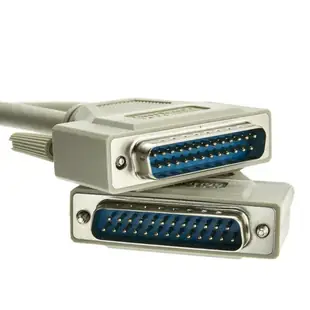
Choose the IEEE 1284 connector pair for a legacy parallel port
A machine with a parallel interface might connect to a printer, a controller or a switch box. Start with the manual’s interface name and connector drawing. The words “bidirectional cable” can describe different end combinations depending on the application.
Which ends need to meet?
Some listed leads use DB25 at both ends, while others run from a DB25 plug to a 36-contact Centronics printer plug. Note the type printed in the listing and check the clips or screw posts on both pieces of equipment. A serial lead may share a DB25 shell with a parallel lead.
Check communication in both directions
If the peripheral appears to work for basic output but status information never returns, verify whether the software requires bidirectional communication and whether the port and cable support it. Try the original direct route before inserting a mechanical switch or extra extension into the signal path.
A parallel accessory is different from a printer
A piece of legacy software may operate a tester or programmer by controlling the computer’s original parallel port. A USB adapter advertised for printers might support printing yet omit behavior that the accessory depends on. Ask the accessory manufacturer whether it supports the exact host interface and operating system you plan to use. If a native parallel port still works on the old machine, document that setup before retiring it. Record the cable type and the application version together so you can tell a change of host interface from a change of cable when rebuilding the workstation later.
Why the two DB25 printer leads on a shelf can differ
Copy the interface name from the controller documentation as well as the connector shape. The six-foot 10E2-05106 is described as an A/A-type bidirectional printer cable with DB25 male ends. Another DB25 cable may have been sold for a serial or switching application. If the software expects status signals from the equipment, the wiring matters even when a basic output seems to work. Compare the manufacturer's required A, B or C interface at each end and preserve any working device configuration before evaluating a replacement lead on the same port.
Order for a computer with a built-in parallel port
Some older desktop cases expose more than one D-sub connector on the same panel. Look for the port label in the firmware or machine manual and map it to the physical opening before making a purchase. If a technician added a separate parallel card, use that card’s documentation as well. Record the type of accessory on the other end and whether the current driver uses a specific port assignment. On a shared service bench this step can prevent a printer cable from being ordered for a serial accessory, even when a quick look from behind the desk makes the two sockets seem much alike.
Compare parts for your setup
Bidirectional Printer Cable, DB25 Male, 18 Twisted Pairs, A/A Type, 6 foot
10E2-05106
- Connector references
- DB25 Male
- Length
- 6 ft
Distinguish a DB25 parallel port from a similar-looking serial port and match the plug at the printer. Measure the installed route against this 6 ft length.
Bidirectional Printer Cable, DB25 Male to Centronics 36 (CN36) Male, IEEE-1284, 18 Twisted Pairs, 6 foot
10E2-01106
- Connector references
- DB25 Male · Centronics 36
- Length
- 6 ft
Identify both connector styles, including whether the printer takes a full-size or miniature Centronics plug. Measure the installed route against this 6 ft length.
Parallel Cable, DB25 Male to HPCentronics 36 (HPCN36) Male, 18 Twisted Pairs, A/C Type, 3 foot
10E2-02103
- Connector references
- DB25 Male
- Length
- 3 ft
Identify both connector styles, including whether the printer takes a full-size or miniature Centronics plug. Measure the installed route against this 3 ft length.


