
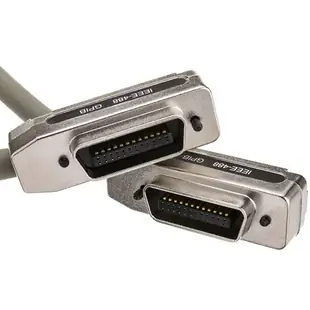
IEEE-488 or IEEE-1284? Find the cable your equipment actually calls for
A test bench and a shipping desk can both have a box marked “IEEE cable.” On the bench it may link a controller to a measuring instrument. At the desk it may carry print jobs to a label or forms printer. The number after IEEE is the most valuable part of the label. Look for a marking such as GPIB, HP-IB, IEEE-488, parallel, LPT or IEEE-1284 before comparing lengths.
What does a GPIB cable connect?
An IEEE-488 or GPIB connection lets an appropriate controller communicate with instruments on the bus. Older equipment may use the name HP-IB. A common bench arrangement uses a controller, a meter and a power supply, each with its own role. Atlas part 11E1-01701 is a one-meter cable with stackable 24-contact male and female connectors at each end. The stacking arrangement lets another cable continue toward a second instrument. Check the space behind the equipment for the connector stack, its fastening hardware and the cable exit. A photograph taken from above the bench can reveal a collision hidden in a front-facing product photo.
How long can my instrument cables be?
Measure every segment of the proposed bus, including cables tucked behind other instruments. NI's guidance for a conventional IEEE-488 setup gives four meters as the maximum separation between adjacent devices, a two-meter average across the bus and a twenty-meter overall ceiling. Device count matters as well. The limits apply together, so a twenty-meter ceiling does not qualify every shorter two-device arrangement. The catalog includes a five-meter GPIB cable. Check the instrument and controller documentation before selecting that length for a particular system. Moving the controller closer can be simpler than extending an entire bench.
What should I record before moving the bench?
Photograph the order of the connected devices and note their GPIB addresses. Label the cable ends by instrument so a replacement can follow the same path. If a computer will become the new controller, identify its supported GPIB interface and driver. The stackable cable connects equipment that already speaks the instrument protocol. A new computer's USB socket needs a compatible controller interface. Test communications with one instrument and a known working configuration before adding the others, keeping the instrument settings used by your application.
Where does an IEEE-1284 printer cable fit?
Read the parallel printer's rear label and compare its receptacle with the connector at the computer or print server. The catalog includes DB25-to-Centronics 36 leads, a high-density 36-contact version and DB25-to-DB25 assemblies. A DB25 on the back of a PC can serve different purposes, so look up its port function too. If your equipment list says IEEE-1284, open the parallel printer section to compare connector types and check driver support. If it says GPIB, keep the instrument address, bus layout and 24-contact plug details with your order.
Compare parts for your setup
GPIB/HPIB Daisy Chain Cable, IEEE-488, CN24 Male and Female on Each End, 1 meter (3.3 foot)
11E1-01701
- Length
- 1 m (3.3 ft)
Check for the 24-contact GPIB socket and the total cable length your instrument system allows. Measure the installed route against this 1 m length.
Bidirectional Printer Cable, DB25 Male, 18 Twisted Pairs, A/A Type, 6 foot
10E2-05106
- Connector references
- DB25 Male
- Length
- 6 ft
Distinguish a DB25 parallel port from a similar-looking serial port and match the plug at the printer. Measure the installed route against this 6 ft length.
Bidirectional Printer Cable, DB25 Male to Centronics 36 (CN36) Male, IEEE-1284, 18 Twisted Pairs, 6 foot
10E2-01106
- Connector references
- DB25 Male · Centronics 36
- Length
- 6 ft
Identify both connector styles, including whether the printer takes a full-size or miniature Centronics plug. Measure the installed route against this 6 ft length.


