
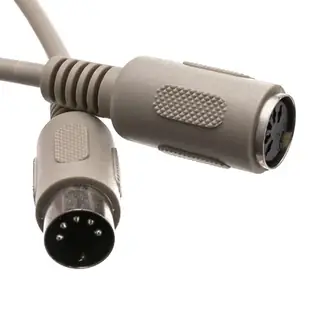
Extend an AT keyboard or replace its removable lead
The round, full-size five-pin plug on an AT keyboard solves only half the identification problem. Find out whether the old keyboard cord is fixed to the keyboard or can be removed, and which port the computer provides.
Cable or extension?
A male-to-female extension accepts the plug already attached to the keyboard. If you are replacing a detachable lead, check what belongs in the keyboard’s own socket. Compare the arc of the pins and the alignment notch directly with the connector on the equipment.
Measure the path to the desk
Count the length of the keyboard’s existing cord before choosing an extension. Measure around the rear of the computer and along the tray with it pulled out. If the round port is the smaller six-pin PS/2 style, look at the Mini-DIN or AT adapter category before choosing a longer five-pin cord.
Is the round plug actually for a keyboard?
Five-pin DIN shells also appear on other kinds of equipment, including musical gear. On a keyboard picked up at an estate sale, read the model label and look for the original computer family or service manual. If the cable is loose in a box beside the keyboard, check the socket on the keyboard itself before assuming the two belong together. A picture of the mating face and original strain relief helps narrow the physical match. The manufacturer’s pinout then answers the more important question of which signals that particular cable must carry.
Extending the keyboard on an old point-of-sale terminal
Inspect the keyboard's own cord first. An attached five-pin DIN plug requires an extension with a matching female socket. The 10I5-02215 is a fifteen-foot, straight-wired five-conductor version with one male and one female end. Measure the run from the terminal's actual keyboard socket to the keyboard's usual position, allowing access for cleaning underneath the counter. If intermittent keys are the reason for replacing the lead, test the keyboard at its original working distance first. That gives you a baseline before adding the extension or routing it through furniture.
Can the keyboard return to its original case?
A vintage keyboard sometimes has a protective case or a recess in a console where its original cable folded in a particular direction. Check the distance between the socket and the case wall with the cover or lid closed. Compare the molded body and strain relief of the replacement with the original, including how far the plug projects once seated. If the keyboard has a permanently attached lead, decide where the larger extension joint will rest so it is not trapped under the keyboard feet. For a restore-and-display project, this small check can preserve the intended physical arrangement as well as the electrical connection.
Compare parts for your setup
AT Keyboard Extension Cable, Din5 Male to Din5 Female, 5 Conductor, Straight, 15 foot
10I5-02215
- Configuration
- 5 Conductor
- Length
- 15 ft
Match the pin arrangement and connector genders to the keyboard and computer. Measure the installed route against this 15 ft length.
AT Keyboard Cable, Din5 Male, 5 Conductor, Straight, 6 foot
10I5-02106
- Configuration
- 5 Conductor
- Length
- 6 ft
Match the pin arrangement and connector genders to the keyboard and computer. Measure the installed route against this 6 ft length.

