
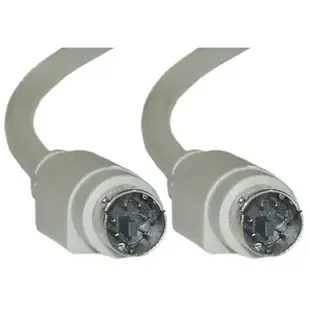
Choose a PS/2 keyboard or mouse cable by its ends
If moving the tower puts the keyboard just out of reach, the free end of the existing cable is the starting point. For a detachable cable that has gone missing, the two sockets on the devices become the starting point instead.
Straight replacement or extension?
Both choices can carry the PS/2 Mini-DIN 6 label. The straight male-to-male family joins compatible sockets. The male-to-female extension family accepts a cable that already ends in a plug. Pick the physical arrangement first, then use the length options on that card to compare the part numbers.
Avoid a misleading match
Check the molded alignment key and the pin arrangement in good light. If you are reconnecting separate keyboard and mouse ports on an older PC or KVM, follow the port labels. A plug seating correctly does not tell you that the lead ended up in the intended socket.
Replacing leads on a shared service cart
A service cart may carry one keyboard and one mouse but several different cable lengths for machines in shallow and deep racks. Measure the longest route the cart must serve, including the distance to each machine’s actual keyboard and mouse ports. Then decide whether the regular short lead plus a separately stored extension is more practical for most visits. Mark both ends of the extension for the intended peripheral. Keep the SKU with that label so the next technician can reorder the same length and gender when a plug is damaged instead of choosing between several identical-looking images.
Does a replacement PS/2 lead need two plugs?
A bench can have both a detachable keyboard cable and a mouse with a permanently attached cord. The straight 10M2-01103 joins two mating six-pin sockets with a male plug at each end. The 10M2-01206 accepts the existing PS/2 plug on the mouse and extends the run by six feet. Mark the keyboard and mouse ports before disconnecting them, and follow the computer manufacturer's power-down guidance. If an installation works only after the cables are swapped at the computer, check which port supports which device before ordering another pair of identical-looking leads.
Check the keyboard after a service restart
An older machine in a workshop might need the PS/2 keyboard during its setup screens as well as after the operating system loads. Follow the hardware documentation when connecting the keyboard and cable, including any instruction to power the machine off first. During an ordinary restart, check the startup keys used by the technician, then verify normal typing once the system has loaded. Test the mouse separately if it has its own route through a KVM. Recording the result at both stages is useful when the working cable is being replaced as part of a larger workstation or switch change.
Compare parts for your setup
PS/2 Cable, Keyboard / Mouse, PS/2(MiniDin6) Male, 6 Conductor, Straight, 3 foot
10M2-01103
- Connector references
- MiniDin6
- Configuration
- 6 Conductor
- Length
- 3 ft
Compare both ends and check whether the computer’s socket accepts a keyboard, a mouse or either device. Measure the installed route against this 3 ft length.
PS/2 Keyboard and Mouse Extension Cable, PS/2 Male to PS/2 Female, MiniDin6 Male to MiniDin6 Female, 6 Conductor, Straight, 6-foot
10M2-01206
- Connector references
- MiniDin6 Male · MiniDin6 Female
- Configuration
- 6 Conductor
- Length
- 6 ft

